SYMPTOM:
When use 3rd party security scan tool such as Acunetix Web Vulnerability Scanner or IBM Security AppScan Standard to implement the security scan toward Strategy Web 10.x, below cross site scripting issue was reported:
The testing URL
http://<webserver>/MicroStrategy/asp/Main.aspx/MicroStrategy/asp/Main.aspx?evt=5008&login=evt=3010&loginReq=true&Main*.aspx=**0&Main.aspx=*0&name=hlp&Port=0&Project=ProjectName&Server=ServerName<ScRiPt%20>prompt(946527)</ScRiPt>&src=Main*.aspx*.3010&src=Main.aspx.login.5008&value=1
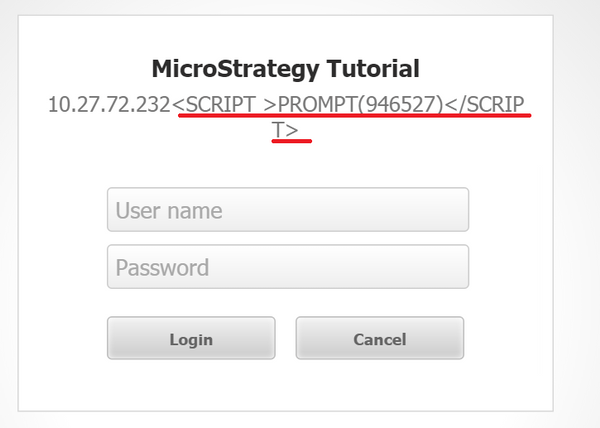
CAUSE:
While the javascript or value passed as Intelligence Server parameter is shown on the projects page, this is not a cross site scripting issue since the script is not executed, only displayed.
In order to prevent the possiblity of content spoofing, Strategy has introduced a new setting in version 10 to prevent this scenario.
ACTION:
To prevent the incorrect name being displayed, modify below setting.
Starting from version 11.3GA, this value is by default 1 which means content spoofing protection is enabled. The sys_defaults.xml looks like the below by default:
<pr des="Check the project name against internal cache prior to displaying it on the login page. Deprecated: now always enabled." n="checkProjectCacheAtLogin" scp="system" v="1" dt="boolean"/>
With the same testing URL, 11.3.10 has the behavior below:
11.3 GA has behavior as below:
Though the script is not executed, it still displays in 11.3GA login page. It is recommended to upgrade to 11.3.10 to take advantage of the clean login page.
