EducationSoftwareStrategy.com
StrategyCommunity

Knowledge Base

Product

Community

Knowledge Base

TopicsBrowse ArticlesDeveloper Zone

Product

Download SoftwareProduct DocumentationSecurity Hub

Education

Tutorial VideosSolution GalleryEducation courses

Community

GuidelinesGrandmastersEvents
x_social-icon_white.svglinkedin_social-icon_white.svg
Strategy logoCommunity

© Strategy Inc. All Rights Reserved.

LegalTerms of UsePrivacy Policy
  1. Home
  2. Topics

KB30968: In MicroStrategy Web 9.x and 10.x re-prompting a report from History List prompts the user to add the report to history even though all reports and documents are set to automatically be added to History List


Community Admin

• Strategy


In MicroStrategy Web 9.x and 10.x re-prompting a report from History List prompts the user to add the report to history even though all reports and documents are set to automatically be added to History List

SYMPTOM:
In Strategy Web 9.x and 10.x re-prompting a report from History List prompts the user to add the report to history even though all reports and documents are set to automatically be added to History List.
 
STEPS TO REPRODUCE:
The following steps use Strategy Tutorial Project to reproduce this issue:

  • In Strategy Web 9.x and 10.x, enable the setting to "Send all reports and documents to History List" Automatically as seen below:
     
ka04W000000Of1sQAC_0EM440000002B3A.jpeg
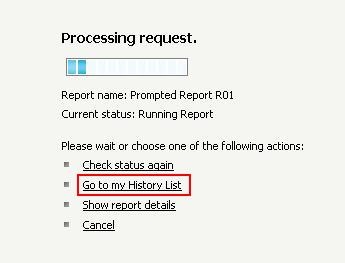
  • Execute a prompted report from Strategy Web and notice that one of the actions in the list below is "Go to my History List". This is because all reports and documents are set to go to History List automatically:
     
ka04W000000Of1sQAC_0EM440000002B2z.jpeg
  • Now click on "Go to my History List" from the link above. After the job has finished executing, the History message will have a Ready Status.
  • Click on the History List message and re-prompt the report by going to Data ->Re-prompt as seen below:
ka04W000000Of1sQAC_0EM440000002B38.jpeg
  • Select a different prompt answer this time and execute the report.
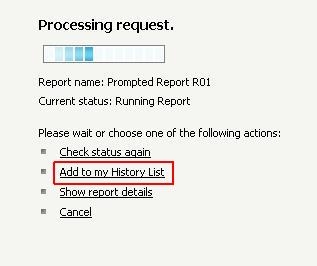
  • Notice that this time one of the actions on the list is "Add to my History List" instead of "Go to my History List":
ka04W000000Of1sQAC_0EM440000002B32.jpeg

 
CAUSE:
 
 
This is working as designed. Strategy Web 9.0 introduced a new setting called 'Duplicate Message on Reprompt or Refresh'. Depending on whether or not this setting is checked, the user will see different behavior. This is described below:
 

  • With this option unchecked, if the user re-prompts on a report retrieved from History List and selects a different prompt answer, the Web wait page will prompt the user to "Add the report to History" as seen below:
ka04W000000Of1sQAC_0EM440000002B34.jpeg
  •  
    Whether or not the user clicks on "Add to my History List", the following behavior is seen:
    The original History List message is overwritten by the new data from the latest report execution.
ka04W000000Of1sQAC_0EM440000002B36.jpeg
  • The original "Matching, History" now becomes "Matching" only but a new "Matching, History" cache is created for the new report execution:
ka04W000000Of1sQAC_0EM440000002B3E.jpeg
  • With this option checked, if the user re-prompts on a report retrieved from History List and selects a different prompt answer, the web wait page will display "Go to my History List" as seen below:
ka04W000000Of1sQAC_0EM440000002B3G.jpeg

  •  
    Since the 'Duplicate Message on Reprompt or Refresh' option is selected, a duplicate History List message is created in the user's Inbox:
ka04W000000Of1sQAC_0EM440000002B3B.jpeg
  • Subsequently, a new cache of type "Matching, History" is created as well:
ka04W000000Of1sQAC_0EM440000002B3J.jpeg


Comment

0 comments

Details

Knowledge Article

Published:

June 15, 2017

Last Updated:

June 15, 2017