EducationSoftwareStrategy.com
StrategyCommunity

Knowledge Base

Product

Community

Knowledge Base

TopicsBrowse ArticlesDeveloper Zone

Product

Download SoftwareProduct DocumentationSecurity Hub

Education

Tutorial VideosSolution GalleryEducation courses

Community

GuidelinesGrandmastersEvents
x_social-icon_white.svglinkedin_social-icon_white.svg
Strategy logoCommunity

© Strategy Inc. All Rights Reserved.

LegalTerms of UsePrivacy Policy
  1. Home
  2. Topics

KB309687: Error when submitting a Transaction Service document with ampersand in the list drop down control in MicroStrategy Web


Community Admin

• Strategy


SYMPTOM:
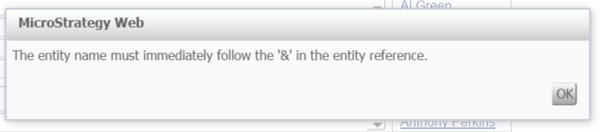
User encounter following error when submitting a Transaction Service document with ampersand in the list drop down control in Strategy Web:
ka04W000000OaaJQAS_0EM4400000025SA.jpeg

 
Error message:


The entity name must immediately follow the '&' in the entity reference.

 
STEPS TO REPRODUCE:
Follow below steps to reproduce with Strategy Tutorial project:

  1. In Tutorial, create an attribute as Brand2, which uses Brand_DESC form from LU_Brand table as ID form.
  2. Create transaction service report as below:
    Update LU_Brand SET Brand_DESC=[Brand@DESC] WHERE Brand_ID=[Brand@ID]
  3. Create report and document use Brand2 and the original Brand attribute in Tutorial.
  4. Configure transaction to the grid.
  5. Run document, select "Hootie & Blowfish" from the drop-down, click submit, issue observed.

 
CAUSE:
This is known issue in Strategy Web 9.x and 10.x.
 
ACTION:
The issue has been fixed in Strategy Web 10.6 and 10.4 HF2. Upgrade to this version or later to resolve this issue.
The Strategy Internal Reference Number for the issue discussed in this technical note is DE41225.
 
KB309687


Comment

0 comments

Details

Knowledge Article

Published:

June 13, 2017

Last Updated:

December 24, 2018