EducationSoftwareStrategy.com
StrategyCommunity

Knowledge Base

Product

Community

Knowledge Base

TopicsBrowse ArticlesDeveloper Zone

Product

Download SoftwareProduct DocumentationSecurity Hub

Education

Tutorial VideosSolution GalleryEducation courses

Community

GuidelinesGrandmastersEvents
x_social-icon_white.svglinkedin_social-icon_white.svg
Strategy logoCommunity

© Strategy Inc. All Rights Reserved.

LegalTerms of UsePrivacy Policy
  1. Home
  2. Topics

KB309710: In MicroStrategy Developer 10.x and earlier the Excel export of a report shows an incorrect Date format with German regional settings


Stefan Zepeda

Salesforce Solutions Architect • Strategy


In MicroStrategy Developer 10.x and earlier when exporting a report to Excel which contains an Attribute Form of type ‘Datetime’, it will show the incorrect Date format when using German as the language in regional settings.

In Strategy Developer 10.x and earlier when exporting a report to Excel which contains an Attribute Form of type ‘Datetime’, it will show the incorrect Date format when using German as the language in regional settings.
  
STEPS TO REPRODUCE:
  • Create a report with ‘Day’ Attribute
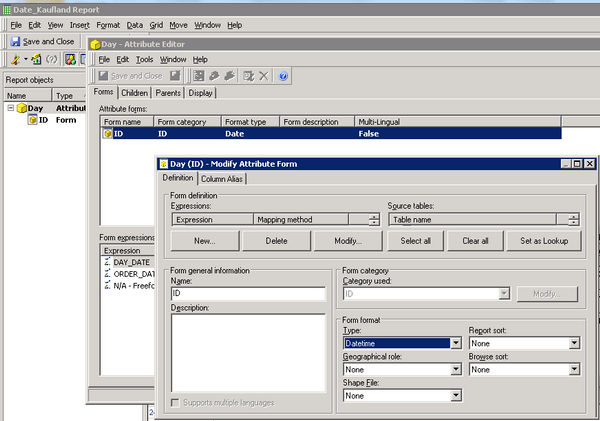
  • Similar like in the picture below, edit the Attribute and change the Type of the ID Attribute Form to ‘Datetime’:
ka02R000000kaXKQAY_0EM440000002C0h.jpeg
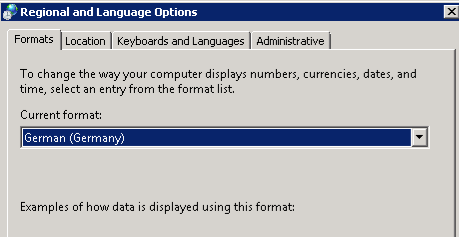
  • Set the regional settings to German:
ka02R000000kaXKQAY_0EM440000002C0n.jpeg
  • Run the report and then go to Data > Export to ... > Excel. The screenshot below shows the different formatting in Strategy Developer and Excel:
ka02R000000kaXKQAY_0EM440000002C0l.jpeg


CAUSE:
This is a known issue in Strategy Developer 9.x and 10.x.
 
ACTION:
Please contact Strategy Technical Support for an update on this issue.


Comment

0 comments

Details

Knowledge Article

Published:

April 14, 2017

Last Updated:

April 14, 2017