EducationSoftwareStrategy.com
StrategyCommunity

Knowledge Base

Product

Community

Knowledge Base

TopicsBrowse ArticlesDeveloper Zone

Product

Download SoftwareProduct DocumentationSecurity Hub

Education

Tutorial VideosSolution GalleryEducation courses

Community

GuidelinesGrandmastersEvents
x_social-icon_white.svglinkedin_social-icon_white.svg
Strategy logoCommunity

© Strategy Inc. All Rights Reserved.

LegalTerms of UsePrivacy Policy
  1. Home
  2. Topics

KB30985: Prompt answers are not passed after the second click on a hyperlink using the originMessageID parameter in MicroStrategy Web.


Community Admin

• Strategy


This article discusses an issue when orompt answers are not passed after the second click on a hyperlink using the originMessageID parameter in MicroStrategy Web.

Symptom

Prompt answers are not passed after the second click on a hyperlink using the originMessageID parameter in Strategy Web.
 

Steps to reproduce

  • Create a document containing prompted reports.
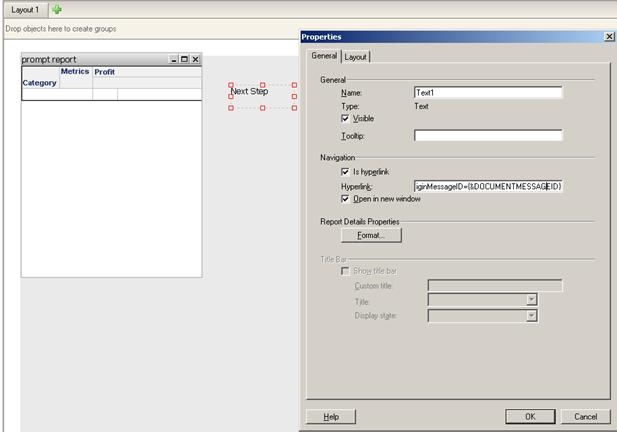
  • Create a URL API link containing the following parameter to execute another document: &src=Main.aspx.2048001&evt=2048001&documentID=DOCUMENT_ID&originMessageID={&DOCUMENTMESSAGEID}

ka04W000000OdPYQA0_0EM440000002GwD.jpeg
  • Execute document in Flash mode.
  • Click on the link to open the linked document, and notice that there's no prompt, which is as expected.
  • Click on the link, in either the parent or child, to open the document again.  Notice that the prompt page appears as if no parameters were passed.

ka04W000000OdPYQA0_0EM440000002GwB.jpeg

 
CAUSE: 
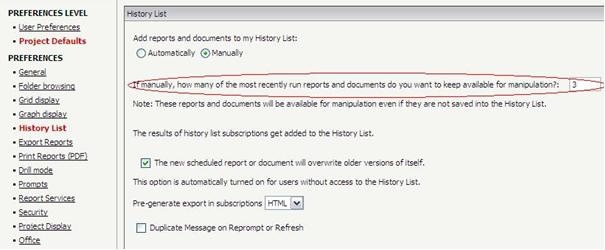
This issue is caused by the working set size being limited to 3, which means it can only store 2 messages.

  • The first time the document is run is the first message
  • The time the link is clicked is the second message. Now the working set is full with two messages.
  • The second time the link is clicked is the 3rd message, thus the execution will fail.


Action

Users can increase the working set size to a larger number as a solution for this issue.
This option is under Web Preferences -> Project Defualts -> History List -> how many of the most recently run reports and documents do you want to keep available for manipulation?


ka04W000000OdPYQA0_0EM440000002GwC.jpeg

 
Customization Warning
This customization is provided as a convenience to Strategy users and is only directly applicable to the version stated. While this code may apply to other releases directly, Strategy Technical Support makes no guarantees that the code provided will apply to any future or previous builds. In the event of a code change in future builds, Strategy Technical Support makes no guarantee that an updated version of this particular customization will be provided. If further assistance is needed please contact Strategy Consulting team.


Comment

0 comments

Details

Knowledge Article

Published:

June 22, 2017

Last Updated:

June 22, 2017