EducationSoftwareStrategy.com
StrategyCommunity

Knowledge Base

Product

Community

Knowledge Base

TopicsBrowse ArticlesDeveloper Zone

Product

Download SoftwareProduct DocumentationSecurity Hub

Education

Tutorial VideosSolution GalleryEducation courses

Community

GuidelinesGrandmastersEvents
x_social-icon_white.svglinkedin_social-icon_white.svg
Strategy logoCommunity

© Strategy Inc. All Rights Reserved.

LegalTerms of UsePrivacy Policy
  1. Home
  2. Topics

KB30989: "Set up has detected that MicroStrategy Office is the only product that is selected to be installed." warning occurs when attempting to install MicroStrategy Office 9.x as a stand alone client from the MicroStrategy 9.x installation package


Community Admin

• Strategy


"Set up has detected that MicroStrategy Office is the only product that is selected to be installed." warning occurs when attempting to install MicroStrategy Office 9.x as a stand alone client from the MicroStrategy 9.x installation package

Symptom

When trying to install Strategy Office 9.x as a stand alone application using the full Strategy 9.x GA installer, the following warning message appears, and the installation cannot continue without selecting another component:

 

ka04W000000OgaRQAS_0EM4400000028Gz.jpeg


Set up has detected that Strategy Office is the only product that is selected to be installed. You will need to select additional products to proceed with the installation.
In order to install Strategy Office as a stand alone application, cancel this installation and run the Strategy Office stand alone installation.

Cause

Strategy Office 9.x is not meant to be installed as the only selected application using the regular Strategy 9.x GA installer.  Strategy Office 9.x can be installed using the full Strategy 9.x installer if other products will also be installed. For stand-alone purposes, Strategy Office 9.x is packaged as an MSI Windows Installer that can be executed in any Windows Machine, the two files are listed below:

  • StrategyOffice.msi
  • StrategyOffice64.msi
     

Action

The Strategy Office 9.x MSI installer is only available in 2 locations and can be accessed in several ways:

  • Location 1: In the full Strategy GA 9.x installation access the Office folder typically in the following location:
    
    9.xxxxx_GA_WIN_Fullzip\Installations\Office

  • Location 2: When Strategy Web Services is installed the following location is created with the MSI files:
    
    C:\Program Files (x86)\Strategy\Web Services\Office

Taking into consideration the locations above there are 4 ways to install Strategy Office 9.x:
  • Installing Strategy Office with the rest of the Strategy platform. As mentioned above, Strategy Office 9.x cannot be installed as an only component when installing the platform, however, it can still be installed alongside other components. 
    For more information refer to the Strategy Installation and Configuration Guide.
  • Installing Strategy Office from a network location or disk. Strategy Administrators can make the Office MSI installer available to users in a network location using location 1 mentioned above. Additionally, if users have access to the Strategy Installation Disk, location 1 is also present in the disk when inserting it into a Windows machine. 
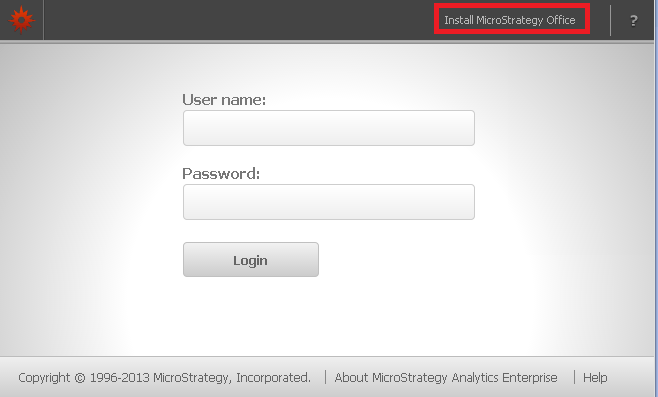
  • Installing Strategy Office using Strategy Web. Strategy Office users need to have access to Strategy Web and the Strategy Administrator has to make the Strategy Office link available to use this option. The link will show as below:
ka04W000000OgaRQAS_0EM4400000028H2.jpeg
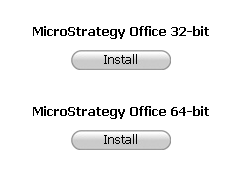
  • Once users click on the link they will be taken to the following installation screen:
ka04W000000OgaRQAS_0EM4400000028H0.jpeg
  • Clicking on the "Install" links will download the MSI from location 2 mentioned above.
  • Installing by manually distributing Strategy Office from location 2. If Strategy users have access to location 2 mentioned above they can manually copy and paste the MSI file to their local machine. Once in the local machine the stand alone installer can be executed successfully. 

 
The Strategy Office MSI installer comes in a 32 bit and 64 bit versions. To correctly determine the one needed for the machine, first verify the version of Microsoft Office installed:

  • Microsoft Office 32 bit requires the StrategyOffice.msi
  • Microsoft Office 64 bit requires the StrategyOffice64.msi

For more information on the methods mentioned above refer to the Strategy Office User Guide, Section 1: Getting Started with Strategy Office.


Comment

0 comments

Details

Knowledge Article

Published:

June 13, 2017

Last Updated:

June 13, 2017