EducationSoftwareStrategy.com
StrategyCommunity

Knowledge Base

Product

Community

Knowledge Base

TopicsBrowse ArticlesDeveloper Zone

Product

Download SoftwareProduct DocumentationSecurity Hub

Education

Tutorial VideosSolution GalleryEducation courses

Community

GuidelinesGrandmastersEvents
x_social-icon_white.svglinkedin_social-icon_white.svg
Strategy logoCommunity

© Strategy Inc. All Rights Reserved.

LegalTerms of UsePrivacy Policy
  1. Home
  2. Topics

KB310046: MicroStrategy Developer crashes when adding Percent Over Rows to a document in MicroStrategy Developer


Community Admin

• Strategy


There is a known defect in MicroStrategy Developer when inserting a Percent Over Rows metric into a MicroStrategy Report Services Document. This crash will not occur in MicroStrategy Developer 10.2, or in any related of MicroStrategy Web

SUMMARY:
There is a known defect in Strategy Developer 10.3 and 10.4 when inserting a Percent Over Rows metric into a Strategy Report Services Document. This crash will not occur in Strategy Developer 10.2, or in the same Document in Strategy Web.
 
SYMPTOM:
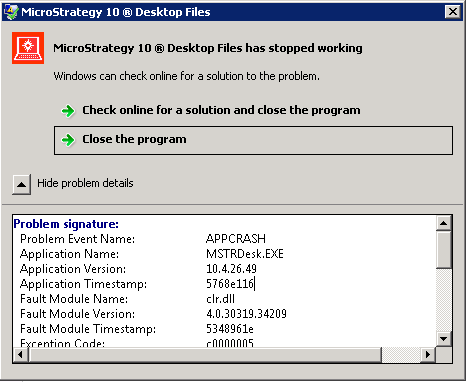
Starting in 10.3 and above, an error message no longer displays when trying to add a Percent Over Rows or Columns metric to an existing grid on a Report Services Document. After attempting to add the metric and changing to PDF view, the application will hang and forcibly quit, showing a Windows error message.
 

ka04W000000uGBBQA2_0EM440000002C0O.jpeg


Problem Event Name: APPCRASH

Application Name: MSTRDesk.EXE


Please note that if you attempt to add a Percent Over Rows or similar metric in Strategy Developer 10.2, you will receive the following message but this will not cause the application to crash.

ka04W000000uGBBQA2_0EM440000002C0P.jpeg

 
STEPS TO REPRODUCE:

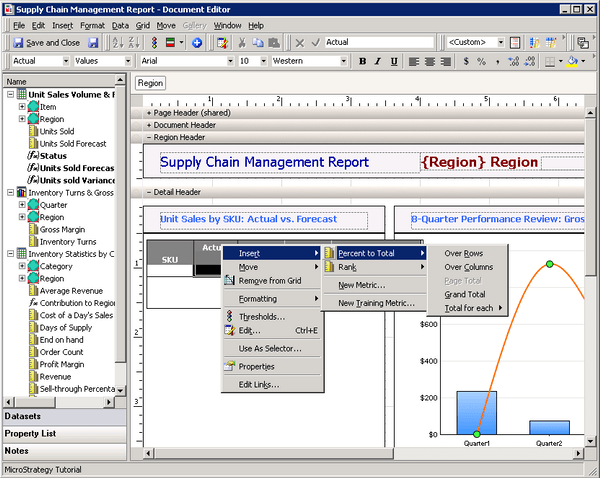
  • In Strategy Developer, open "Supply Chain Management Report" in Strategy Tutorial Enterprise Reporting Documents
  • Edit the grid under 'Unit Sales by SKU: Actual vs. Forecast'
  • Insert a Percent to Total over Columns or Over Rows metric.
ka04W000000uGBBQA2_0EM440000002C0S.jpeg
  • Note the metric is not added
  • Click PDF view
  • Attempt to close out of the report. Click 'no' when it asks to save changes made
  • At this point the Strategy Developer application will hang or directly crash
  • Windows error shown:
ka04W000000uGBBQA2_0EM440000002C0T.jpeg

 
CAUSE:
This is an identified defect in Strategy Developer for versions 10.3 to 10.6.
 
ACTION:
This issue has been addressed starting in 10.7, 10.4 Hotfix 3, and later. Upgrade to these versions to take advantage of this fix
 
WORKAROUND:
To successfully add a Percent Over Columns metric in Strategy 10.3 or 10.4, please edit the Report Service Document via Strategy Web

ka04W000000uGBBQA2_0EM440000002C0J.jpeg

 
This workaround does not currently allow for adding a Percent Over Rows metric as that is not a default option in Strategy Web.
 
The Strategy Internal Reference Number for the issue discussed in this technical note is DE44133
KB310046


Comment

0 comments

Details

Knowledge Article

Published:

June 8, 2017

Last Updated:

December 26, 2018