SUMMARY:
This Technical Note describers a known issue when using geo-attributes on dashboards. The impact is limited to the 'browse all objects' option on dashboard in Strategy Web 10.x. Several workarounds for this issue have been provided below for use in current releases.
SYMPTOM:
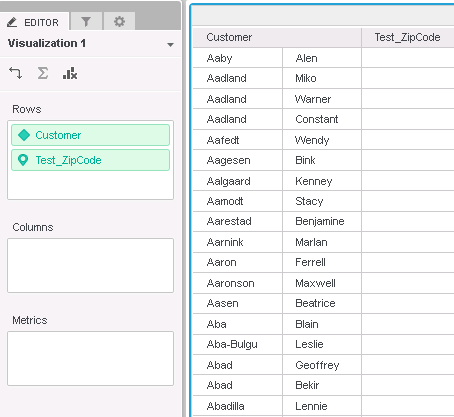
In Strategy 10.x, no data is returned on the grid when a geo-attribute is directly added to a Dashboard via Web using the 'browse all objects' option.
STEPS TO REPRODUCE:
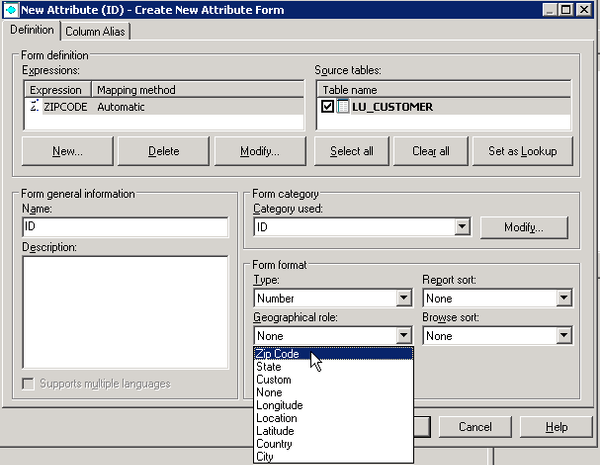
Follow these steps to reproduce the issue in the Strategy Tutorial project.
CAUSE:
This is a known issue identified in Strategy 10.x
ACTION:
This issue has been addressed in 10.7 and 10.4 Hotfix 5 or above versions, please upgrade to take advantage of the fix.
WORKAROUND:
Users can use any of these options to work around this issue;
Option 1:
Option 2:
Edit the attribute -> modify the attribute form -> change the geographic role to 'None' (from figure 1 above). This will change the attribute from a geo-attribute to a regular attribute which can be used directly on a dashboard.
Option 3:
Use a document instead of a dashboard. The geo-attribute can be placed in grid on the document without issue.
KB310070
