EducationSoftwareStrategy.com
StrategyCommunity

Knowledge Base

Product

Community

Knowledge Base

TopicsBrowse ArticlesDeveloper Zone

Product

Download SoftwareProduct DocumentationSecurity Hub

Education

Tutorial VideosSolution GalleryEducation courses

Community

GuidelinesGrandmastersEvents
x_social-icon_white.svglinkedin_social-icon_white.svg
Strategy logoCommunity

© Strategy Inc. All Rights Reserved.

LegalTerms of UsePrivacy Policy
  1. Home
  2. Topics

KB31013: How to create user profile folders and modify their default ACLs before the new users log into Microstrategy


Stefan Zepeda

Salesforce Solutions Architect • Strategy


This tech note outlines how to create the profile folder before the new user logs into a project and how to modify its default ACL so users other than Administrator can have full control access to the profile folder.

Typically, profile folders of new users are not created until those users log into a project for the first time. When the profile folder is created, only the user and Administrator have full control access to it.
This tech note outlines how to create the profile folder before the new user logs into a project and how to modify its default ACL so users other than Administrator can have full control access to the profile folder.
The following steps show how to implement this functionality in Strategy Command Manager:
ka02R000000kWzDQAU_0EM440000002ENa.jpeg
  • Create User Profile Folder
     
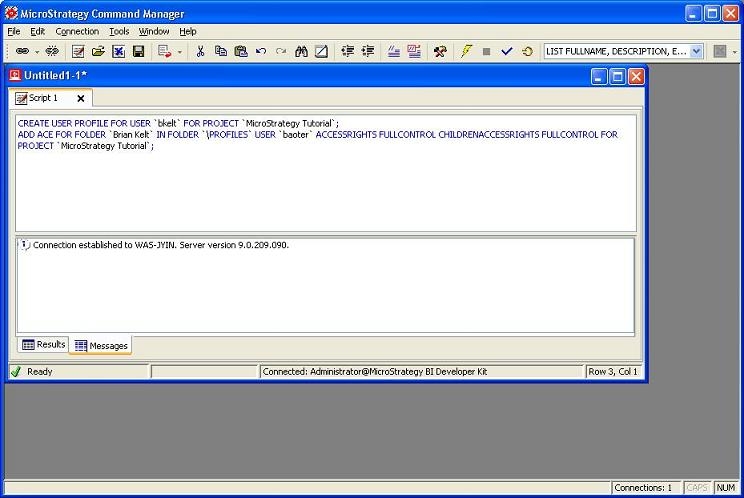
    • In Strategy Command Manager, using the User Profile outlines to write a script to create the user profile folder. For example, to create profile folder for user with ID `bkelt` in Strategy Tutorial project, type the following command:
      • CREATE USER PROFILE FOR USER `bkelt` FOR PROJECT `Strategy Tutorial`;
  • Modify the Folder ACLs.
     
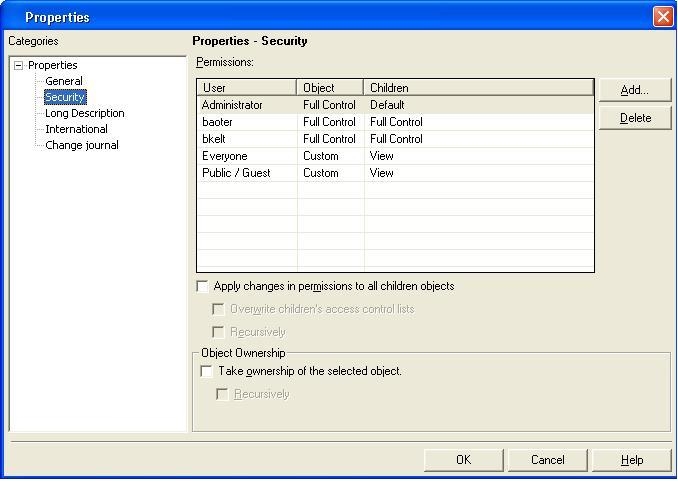
    • Create a script to modify the ACL of the profile folder using the ACL outlines. For example, to grant user with ID `baoter` FULL CONTROL permission to bkelt`s profile folder in Strategy Tutorial Project, type the following command:
       
ka02R000000kWzDQAU_0EM440000002ENR.jpeg
      • ADD ACE FOR FOLDER `Brian Kelt` IN FOLDER `\Profiles` USER `baoter` ACCESSRIGHTS FULLCONTROL CHILDRENACCESSRIGHTS FULLCONTROL FOR PROJECT `Strategy Tutorial`;
  • Login to Strategy Developer. Note the changes in the ACL.


Comment

0 comments

Details

Knowledge Article

Published:

April 12, 2017

Last Updated:

April 12, 2017