EducationSoftwareStrategy.com
StrategyCommunity

Knowledge Base

Product

Community

Knowledge Base

TopicsBrowse ArticlesDeveloper Zone

Product

Download SoftwareProduct DocumentationSecurity Hub

Education

Tutorial VideosSolution GalleryEducation courses

Community

GuidelinesGrandmastersEvents
x_social-icon_white.svglinkedin_social-icon_white.svg
Strategy logoCommunity

© Strategy Inc. All Rights Reserved.

LegalTerms of UsePrivacy Policy
  1. Home
  2. Topics

KB31022: “Project duplication could not acquire exclusive locks to the source and destination project sources. Please clear existing locks on the project sources and try again” is received when trying to duplicate a project in MicroStrategy Object Manager


Community Admin

• Strategy


When attempting to duplicate a project in MicroStrategy Object Manager 9.4.x-10.x user may find the error “Project duplication could not acquire exclusive locks to the source and destination project sources. Please clear existing locks on the project sources and try again”

SYMPTOM:
When attempting to duplicate a project in Strategy Object Manager 9.4.x-10.x user may find the error “Project duplication could not acquire exclusive locks to the source and destination project sources. Please clear existing locks on the project sources and try again” as shown in the image below:

ka04W000000OdZ9QAK_0EM440000002EOF.jpeg

Sample Code/Error
Project duplication could not acquire exclusive locks to the source and destination project sources. Please clear existing locks on the project sources and try again
 
STEPS TO REPRODUCE:
Execute the following in Strategy Tutorial:
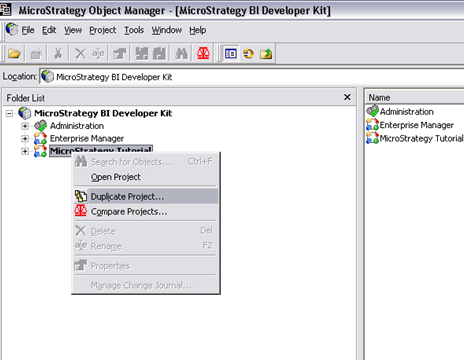
  • Open Strategy Object Manager
  • Open a Project Source to Strategy Tutorial.
  • Right mouse click on Strategy Tutorial and select Duplicate Project as shown in the image below:
ka04W000000OdZ9QAK_0EM440000002EOG.jpeg
  •  
    The user will now receive the following error:
ka04W000000OdZ9QAK_0EM440000002EOD.jpeg
  •  

    Sample Code/Error
    Project duplication could not acquire exclusive locks to the source and destination project sources. Please clear existing locks on the project sources and try again.

 
CAUSE:
Strategy is working as design. When using Strategy Object Manager, there are locks applied to the project.
 
ACTION:
Close the project source in Strategy Object Manager to the Strategy Tutorial metadata and then the user has the option of performing the duplication by clicking on Project -> Duplicate Project from the Object Manager menu as shown in the image below instead of Strategy Developer if desired:

ka04W000000OdZ9QAK_0EM440000002EOI.jpeg

Comment

0 comments

Details

Knowledge Article

Published:

April 11, 2017

Last Updated:

April 11, 2017
