EducationSoftwareStrategy.com
StrategyCommunity

Knowledge Base

Product

Community

Knowledge Base

TopicsBrowse ArticlesDeveloper Zone

Product

Download SoftwareProduct DocumentationSecurity Hub

Education

Tutorial VideosSolution GalleryEducation courses

Community

GuidelinesGrandmastersEvents
x_social-icon_white.svglinkedin_social-icon_white.svg
Strategy logoCommunity

© Strategy Inc. All Rights Reserved.

LegalTerms of UsePrivacy Policy
  1. Home
  2. Topics

KB310308: How to Enable SSL Encryption with Microsoft SQL Server for use in MicroStrategy 10.x


Community Admin

• Strategy


Users creating a SQL Server DSN with SSL authentication may experience the message "Cannot load trust store" when using the included MicroStrategy ODBC connection. This can be resolved by allowing only SSL verification in the ODBC settings for Microsoft SQL Server.

SUMMARY:
Users creating a SQL Server DSN with SSL authentication may experience the message "Cannot load trust store" when using the included Strategy ODBC connection. This can be resolved by allowing only SSL verification in the ODBC settings for Microsoft SQL Server.
 
ENABLING SSL VIA CONNECTIVITY WIZARD:

  • Open Connectivity wizard and select a Microsoft SQL server connection.
ka04W000001IwHuQAK_0EM440000002J9F.jpeg
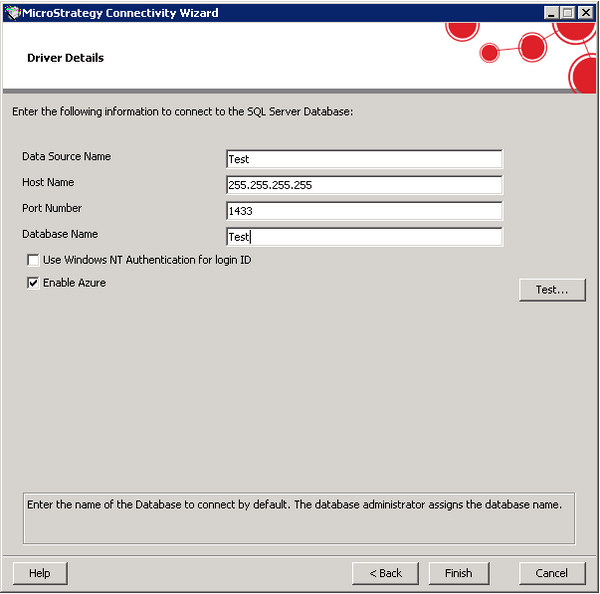
  • After clicking Next, ensure that the 'Enable Azure' setting is marked in addition to required connection information.
ka04W000001IwHuQAK_0EM440000002J9E.jpeg
  • Click finish to resolve the ODBC creation
     
  • Create the DSN in Strategy as normal.

 
ENABLING SSL VIA ODBC DATA SOURCE ADMINISTRATOR:
If you wish to modify an existing Microsoft SQL Server connection, adjust settings shown in step 3.
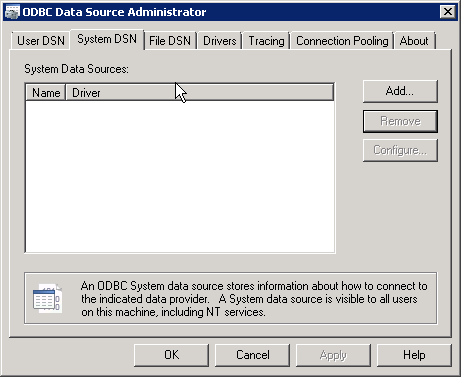
  • In Windows Environments, Run ODBC Data Source Administrator, clicking Add under System DSN
ka04W000001IwHuQAK_0EM440000002J9G.jpeg
  • Select Strategy ODBC Driver for SQL Server Wire Protocol
ka04W000001IwHuQAK_0EM440000002J9D.jpeg
  • Under the Security Tab, ensure Encryption Method is set to 1 - SSL and the Validate Server Certificate setting is unchecked
ka04W000001IwHuQAK_0EM440000002J94.jpeg

 
ENABLING SSL ON UNIX/LINUX:
Edit the odbc.ini and set the following values in the DSN:
EncryptionMethod=1
ValidateServerCertificate=0
 
 
THIRD PARTY SOFTWARE WARNING:
This article is meant to provide guidance on using a third party tool, ODBC Data Source Administrator is not property of Strategy Inc. Additionally, Strategy Technical Support will not provide troubleshooting on this product.
 
KB310308


Comment

0 comments

Details

Knowledge Article

Published:

June 5, 2017

Last Updated:

December 31, 2018