EducationSoftwareStrategy.com
StrategyCommunity

Knowledge Base

Product

Community

Knowledge Base

TopicsBrowse ArticlesDeveloper Zone

Product

Download SoftwareProduct DocumentationSecurity Hub

Education

Tutorial VideosSolution GalleryEducation courses

Community

GuidelinesGrandmastersEvents
x_social-icon_white.svglinkedin_social-icon_white.svg
Strategy logoCommunity

© Strategy Inc. All Rights Reserved.

LegalTerms of UsePrivacy Policy
  1. Home
  2. Topics

KB31031: "Generate SQL for fact allocation failed" error message appears when executing a report in MicroStrategy Developer 9.4.x and 10.x while using a fact using the CASE function as part of its definition.


Stefan Zepeda

Salesforce Solutions Architect • Strategy


"Generate SQL for fact allocation failed" error message appears when executing a report in MicroStrategy Developer 9.4.x and 10.x while using a fact using the CASE function as part of its definition.

SYMPTOM:
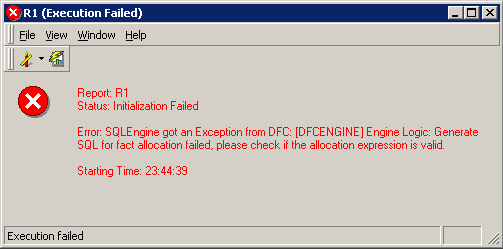
A report fails to generate SQL or execute in Strategy Developer with the following error:
 

ka02R000000kcTcQAI_0EM440000002EPC.jpeg


Status: Initialization Failed
Error: SQLEngine got an Exception from DFC: Engine Logic: Generate SQL for fact allocation failed, please check if the allocation expression is valid.
 
CAUSE:
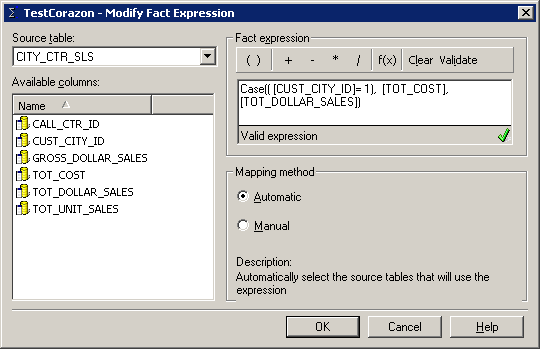
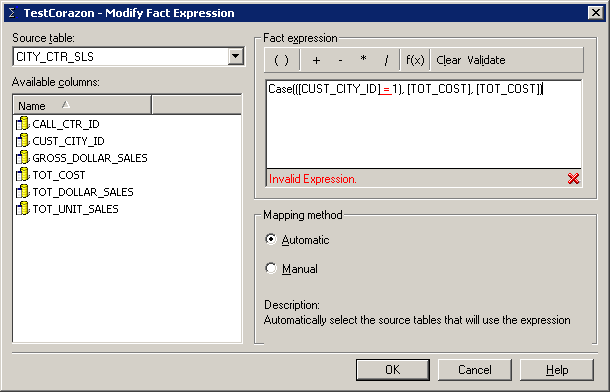
A CASE function inside the fact definition cannot be translated into appropriate SQL. The definition of the function was validated initially, however if the fact is edited and the expression is re-validated it will be evaluated as an invalid expression.
 
Initial Fact Creation evaluates the expression correctly:

ka02R000000kcTcQAI_0EM440000002EPB.jpeg

 
Re-editing the fact and hitting the validate butting once again will evaluate the expression as invalid now.
 

ka02R000000kcTcQAI_0EM440000002EPE.jpeg

 
ACTION:
Use an ApplySimple expression. The definition of the fact will have to follow the appropriate native CASE statement depending on the database type.


Comment

0 comments

Details

Knowledge Article

Published:

April 18, 2017

Last Updated:

April 18, 2017