SYMPTOM
From Strategy Web, when users import data from a Database and save the cube, the error occurs:
Error in saving the cube, com.Strategy.webapi.MSTRWebAPIException:()
After clicking the button OK, then go to the Shared folder, the cube is successfully created and working fine after it's manually republished.
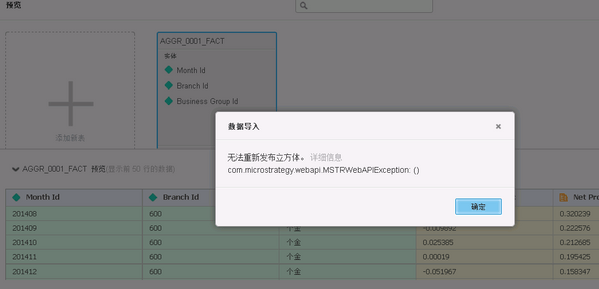
Errors are logged into DSSError.log:
[Kernel][Error] hSaveSubscriptionACL:
Failed to invalid subscription by the new change of subscription ACL. Error 0x800645F9
#define MSI_NCS_CS_NOT_AVAILABLE 0x800645F9
#define MSI_NCS_CS_NOT_AVAILABLE_S_EN "Distribution Services content service metadata is not available."
Error in saving the cube, com.microstrategy.webapi.MSTRWebAPIException:() |
CAUSE
One possible cause for the error is that the option 'Use Strategy Scheduler' is not enabled in customer's environment. The path of the setting:
Intelligence Server Configuration Editor -> Server definition category -> Advanced
'Use Strategy Scheduler' enables the scheduling features in the Strategy environment. If this check box is cleared, neither the reports nor administration tasks can be scheduled. By default, this check box is selected.
ACTION
The issue can be resolved by enabling the "Use Strategy Scheduler" option.
