EducationSoftwareStrategy.com
StrategyCommunity

Knowledge Base

Product

Community

Knowledge Base

TopicsBrowse ArticlesDeveloper Zone

Product

Download SoftwareProduct DocumentationSecurity Hub

Education

Tutorial VideosSolution GalleryEducation courses

Community

GuidelinesGrandmastersEvents
x_social-icon_white.svglinkedin_social-icon_white.svg
Strategy logoCommunity

© Strategy Inc. All Rights Reserved.

LegalTerms of UsePrivacy Policy
  1. Home
  2. Topics

KB310329: How to achieve attribute left outer join effect in MicroStrategy Web


Community Admin

• Strategy


How to achieve attribute left outer join effect in MicroStrategy Web

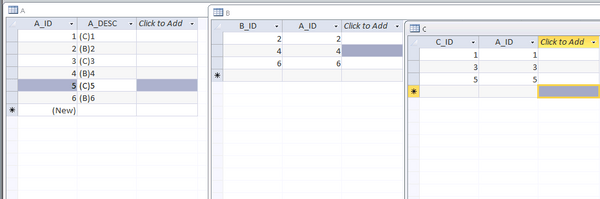
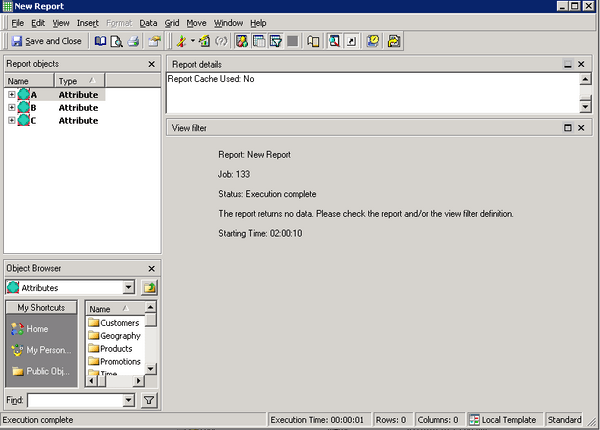
Left outer join for attribute is  unavailable in Developer. For example, here are three tables in warehouse. Create three attributes named A, B, C, and after them added in a report in Developer, no data returns, as showed below.
ka04W000000OfsnQAC_0EM4400000025Qh.jpeg


ka04W000000OfsnQAC_0EM4400000025Qm.jpeg

This article is to introduce a workaround to achieve the attribute left outer join on Strategy Web. Steps are as below.
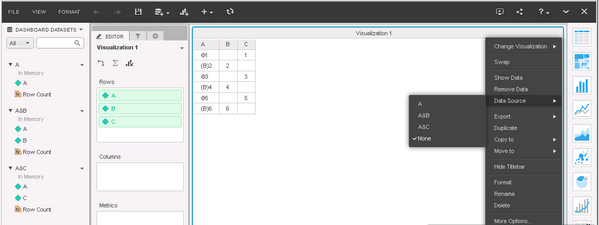
  1. Create three reports named A (with attribute A), A&B (with attribute A and B),A&C (with attribute A and C)
  2. Create a dashboard based on the three reports created in last step.
  3. In the right corner of the dashboard, change the data source to none.  


ka04W000000OfsnQAC_0EM4400000025Qj.jpeg


Comment

0 comments

Details

Knowledge Article

Published:

June 15, 2017

Last Updated:

June 15, 2017