EducationSoftwareStrategy.com
StrategyCommunity

Knowledge Base

Product

Community

Knowledge Base

TopicsBrowse ArticlesDeveloper Zone

Product

Download SoftwareProduct DocumentationSecurity Hub

Education

Tutorial VideosSolution GalleryEducation courses

Community

GuidelinesGrandmastersEvents
x_social-icon_white.svglinkedin_social-icon_white.svg
Strategy logoCommunity

© Strategy Inc. All Rights Reserved.

LegalTerms of UsePrivacy Policy
  1. Home
  2. Topics

KB310423: User session is lost when sharing a cube which is created by data import in MicroStrategy Web 10.4


Community Admin

• Strategy


User session is lost when sharing a cube which is created by data import in MicroStrategy Web 10.4

SYMPTOM:
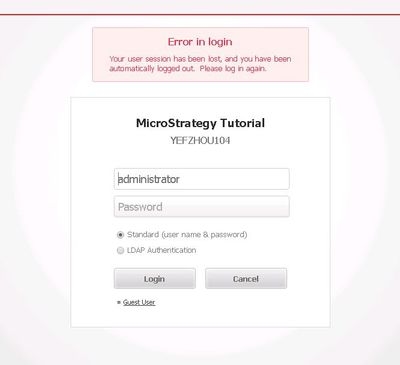
When sharing a cube which is created by data import in Strategy Web 10.4, user is automatically logged out, as below picture shown:
ka04W000000OfsMQAS_0EM4400000025Qi.jpeg


Your user session has been lost, and you have been automatically logged out. Please log in again.

STEPS TO REPRODUCE:

  1. Create an Intelligent Cube through Data Import
  2. Right mouse click on the cube and select 'Share'
  3. Add a user and click on 'Add' button
  4. The page goes to login page, and error appears:
    'Your user session has been lost, and you have been automatically logged out, please log in again.' 

CAUSE:
This is a known issue in Strategy Web 10.4
ACTION:
The issue is fixed in 10.4 Hotfix1. Please upgrade to take the advantage of fix.


Comment

0 comments

Details

Knowledge Article

Published:

June 13, 2017

Last Updated:

June 13, 2017