EducationSoftwareStrategy.com
StrategyCommunity

Knowledge Base

Product

Community

Knowledge Base

TopicsBrowse ArticlesDeveloper Zone

Product

Download SoftwareProduct DocumentationSecurity Hub

Education

Tutorial VideosSolution GalleryEducation courses

Community

GuidelinesGrandmastersEvents
x_social-icon_white.svglinkedin_social-icon_white.svg
Strategy logoCommunity

© Strategy Inc. All Rights Reserved.

LegalTerms of UsePrivacy Policy
  1. Home
  2. Topics

KB310650: How to re-prompt a document through a hyperlink on Presentation Mode using MicroStrategy Web 10.1 and above


Community Admin

• Strategy


In certain cases, users shall be given the possibility to re-prompt the currently viewed Report Services document through a link on the document template using MicroStrategy Web. Using URL API to re-run the current document does not preserve the previously selected prompt answers and displays the default prompt answers instead. The approach described below allows to trigger the out of the box re-prompt action, thus preserving the previously selected prompt answers, through a hyperlink.

 
SYMPTOM
In certain cases, users shall be given the possibility to re-prompt the currently viewed Report Services document through a link on the document template using Strategy Web. Using URL API to re-run the current document does not preserve the previously selected prompt answers and displays the default prompt answers instead. The approach described below allows to trigger the out of the box re-prompt action, thus preserving the previously selected prompt answers, through a hyperlink.
 
ACTION
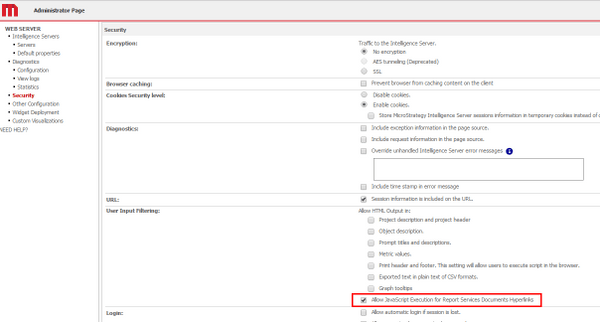
  • On the Web Administration page > Security > User Input Filtering, enable the "Allow JavaScript Execution for Report Services Documents Hyperlinks" setting
ka04W000000ObHcQAK_0EM4400000025Sy.jpeg
  • On the Report Services document, insert a textbox.
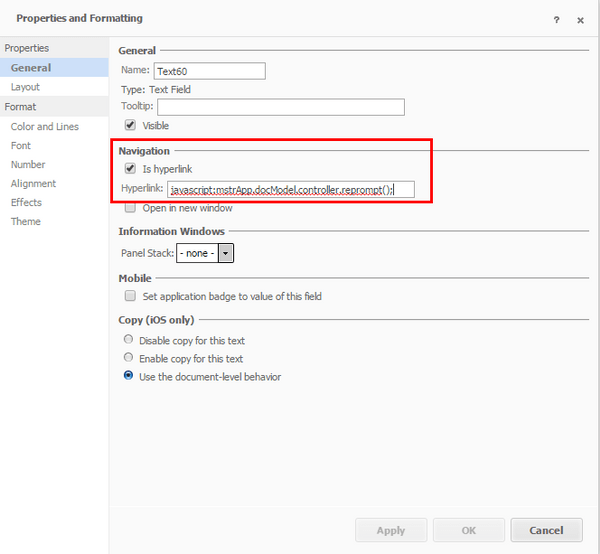
  • Right-click the textbox and select Properties and Formatting > Navigation > Is hyperlink
  • Enter the following hyperlink: 
ka04W000000ObHcQAK_0EM4400000025Sx.jpeg
  •  
    
    javascript:mstrApp.docModel.controller.reprompt();
    
    --> Replace : with :

  • Save and execute the document. Note that clicking the above link will trigger the prompts page and sets the prompt answers selected on the initial document execution as default prompt answers.

NOTE: This Technical Note is only applicable to Presentation Mode.
310650


Comment

0 comments

Details

Knowledge Article

Published:

June 7, 2017

Last Updated:

March 28, 2019