EducationSoftwareStrategy.com
StrategyCommunity

Knowledge Base

Product

Community

Knowledge Base

TopicsBrowse ArticlesDeveloper Zone

Product

Download SoftwareProduct DocumentationSecurity Hub

Education

Tutorial VideosSolution GalleryEducation courses

Community

GuidelinesGrandmastersEvents
x_social-icon_white.svglinkedin_social-icon_white.svg
Strategy logoCommunity

© Strategy Inc. All Rights Reserved.

LegalTerms of UsePrivacy Policy
  1. Home
  2. Topics

KB310668: SSL Handshake aborted error when opening configuration link with TLS 1.2 connection used on Android OS below 5.0 device with MicroStartegy 10.4.


Community Admin

• Strategy


This document discusses about the SSL Handshake aborted error on Android devices with MicroStartegy 10.4.

SYMPTOM:

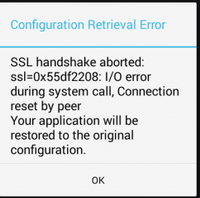
Mobile users receive a "SSL handshake aborted: ssl=0x55df2208: I/O error during system call, Connection reset by peer. Your application will be restored to the original configuration." error message when opening a configuration link on an Android 4.x device when a TLS 1.2 connection is used as shown below:
ka04W000000OfwPQAS_0EM4400000029nR.jpeg


STEPS TO REPRODUCE:

1. Create a configuration link for an android device in an environment using TLS 1.1 or 1.2 for connections.
2. Open that link on an Android device 4.x with a Strategy app 10.4.
 

CAUSE:

TLS 1.2 is supported on Android above 4.1, but not enabled by default on Android below 5.0. It was enabled starting version 5.0 as written here:
https://developer.android.com/about/versions/android-5.0-changes.html.
 

WORKAROUND:

Use an Android device with Android version 5.0 or above.
 

ACTION:

The behavior was changed in Strategy Android app version 10.5 that forces Android 4.x devices to use TLS 1.2. Please upgrade to that version of the app if you would like to use TS 1.2 on Android below 5.0 devices.


Comment

0 comments

Details

Knowledge Article

Published:

April 25, 2017

Last Updated:

July 17, 2017