EducationSoftwareStrategy.com
StrategyCommunity

Knowledge Base

Product

Community

Knowledge Base

TopicsBrowse ArticlesDeveloper Zone

Product

Download SoftwareProduct DocumentationSecurity Hub

Education

Tutorial VideosSolution GalleryEducation courses

Community

GuidelinesGrandmastersEvents
x_social-icon_white.svglinkedin_social-icon_white.svg
Strategy logoCommunity

© Strategy Inc. All Rights Reserved.

LegalTerms of UsePrivacy Policy
  1. Home
  2. Topics

KB310682: Color palette cannot be saved although user has Web privileges granted in MicroStrategy Web 10.0-10.5


Community Admin

• Strategy


SYMPTOM:
In Project Defaults when adding new color palette the exclamation mark appears and palette is not saved as shown below:

ka04W000000OeCvQAK_0EM4400000025QY.jpeg

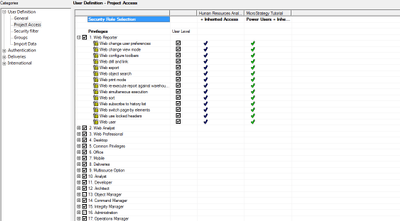
User has granted all Common and Web Privileges as below:
ka04W000000OeCvQAK_0EM4400000025Qa.jpeg

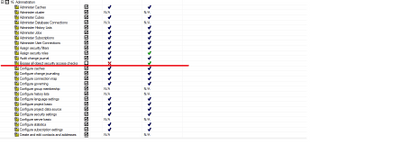
In order to enable Color palette saving the “Bypass all object security access checks” need to be checked. 
ka04W000000OeCvQAK_0EM4400000025Qd.jpeg

 
CAUSE:
It is a known issue in MicroStartegy 10.x
 
ACTION:
This issue is addresed in Strategy 10.6.


Comment

0 comments

Details

Knowledge Article

Published:

June 13, 2017

Last Updated:

June 13, 2017