EducationSoftwareStrategy.com
StrategyCommunity

Knowledge Base

Product

Community

Knowledge Base

TopicsBrowse ArticlesDeveloper Zone

Product

Download SoftwareProduct DocumentationSecurity Hub

Education

Tutorial VideosSolution GalleryEducation courses

Community

GuidelinesGrandmastersEvents
x_social-icon_white.svglinkedin_social-icon_white.svg
Strategy logoCommunity

© Strategy Inc. All Rights Reserved.

LegalTerms of UsePrivacy Policy
  1. Home
  2. Topics

KB310731: When trying to create a new list in a derived element in Web in a report, nothing gets created.


Community Admin

• Strategy


SUMMARY:
This issue has been classified as a defect by Strategy.  The impact is from the Strategy Web 10.0 – 10.3 product. A workaround is available in the current document. A solution/code fix for this issue is available in current releases.
SYMPTOM:
In Strategy Web, you have the option to create derived elements in Web for a report; when trying to create a new list in Safari, the derived element cannot be created since nothing shows.
STEPS TO REPRODUCE:
  1. Open Strategy Web in Safari.
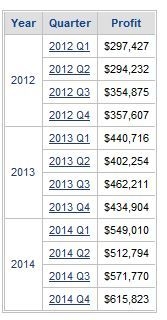
  2. In Strategy Tutorial, create a report with Year, Quarter and Profit.


ka04W000000Of3PQAS_0EM4400000025Sd.jpeg
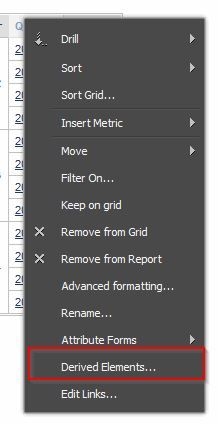
  1. Right-click the Quarter attribute and select Derived Elements.


ka04W000000Of3PQAS_0EM4400000025Sc.jpeg


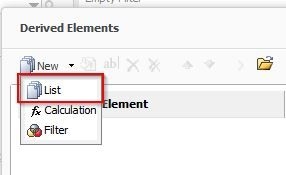
  1. Click on New - List and notice nothing happens.


ka04W000000Of3PQAS_0EM4400000025SU.jpeg

 CAUSE:
This is a known issue in Strategy Object Web 10.0 – 10.3 in the Safari browser.
ACTION:
This issue has been fixed in Strategy Web 10.4. Upgrade to this version to take advantage of the fix.
WORKAROUND:
Create derived elements for a report in a different browser.
 
The Strategy Internal Reference Number for the issue discussed in this technical note is DE32231.


Comment

0 comments

Details

Knowledge Article

Published:

June 12, 2017

Last Updated:

June 12, 2017