The Distribution Services features delivery notification emails that can be sent to the administrator or any other user defined. These notification can be modified depending on what the administrator wants to show in the email notification for successful delivery.
In Strategy Web, when sending a file delivery for example, the user can automatically place the email address where they want the notification to be sent.

The user will receive an email with the following information by default:
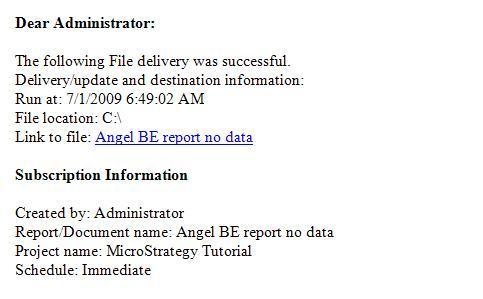
This information in turn is defined in the Project configuration for Email, File, History, cache and Mobile delivery. The following are examples of the options available for File and Email deliveries.

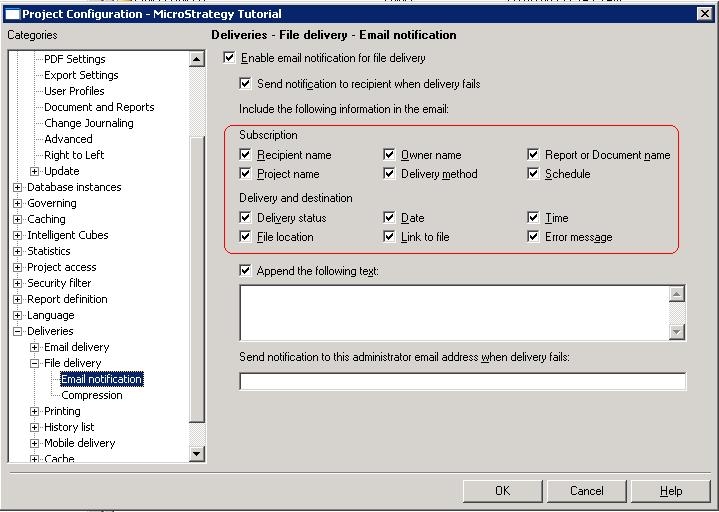
A user can uncheck any of the delivery information under 'Delivery status' to omit the information in the email. Furthermore, the user can add information to the delivery notification email by writing it directly in the available text field under 'Append the following text', which will eventually append whatever has been witten to the end of the notification email.
Here is an example of a file delivery, where the user does not want to show the File location populated by default in Strategy, and wants instead to add a generic message to the end of the email notification for the users to see.


Note: In Strategy 10.x, the message is fully customizable.
