EducationSoftwareStrategy.com
StrategyCommunity

Knowledge Base

Product

Community

Knowledge Base

TopicsBrowse ArticlesDeveloper Zone

Product

Download SoftwareProduct DocumentationSecurity Hub

Education

Tutorial VideosSolution GalleryEducation courses

Community

GuidelinesGrandmastersEvents
x_social-icon_white.svglinkedin_social-icon_white.svg
Strategy logoCommunity

© Strategy Inc. All Rights Reserved.

LegalTerms of UsePrivacy Policy
  1. Home
  2. Topics

KB31083: "Device 'XXX' cannot be deleted because it is used by N object(s)." error message appears when deleting a device in MicroStrategy Distribution Services 9.x


Community Admin

• Strategy


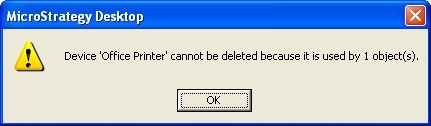
When trying to delete a device from MicroStrategy Distribution Services in MicroStrategy Developer 9.x, the error "Device 'XXX' cannot be deleted because it is used by N object(s)." appears preventing the device from being deleted.

SYMPTOM:
When trying to delete a device from Strategy Distribution Services in Strategy Developer 9.x the following error is displayed preventing the device from being deleted:
 

ka04W000000OgutQAC_0EM440000002B2M.jpeg

 
Sample Code/Error
Device 'Office Printer' cannot be deleted because it is used by 1 object(s).
 
 
CAUSE:
An object still exists which is dependent on the device. One possible dependent object is a user/contact address.
 
 
ACTION:
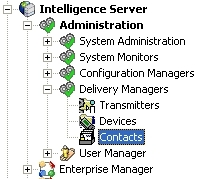
The following steps can be taken to locate and remove the dependent address objects:
 

ka04W000000OgutQAC_0EM440000002B2C.jpeg


ka04W000000OgutQAC_0EM440000002B2S.jpeg


ka04W000000OgutQAC_0EM440000002B2Q.jpeg


ka04W000000OgutQAC_0EM440000002B2P.jpeg


ka04W000000OgutQAC_0EM440000002B28.jpeg


  1. Login to Strategy Desktop 9.x as an administrator.
  2. Navigate to Administration > Delivery Monitors > Contacts:
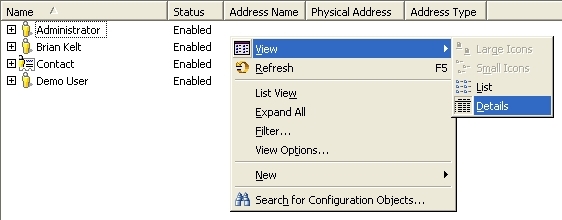
  3. Right-click in the right pane and choose 'View' > 'Details':
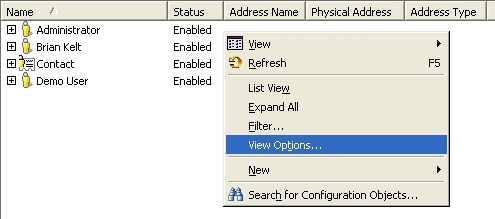
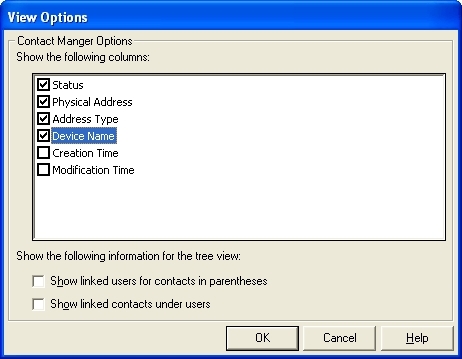
  4. Right-click in the right pane and choose 'View Options...'. Verify the 'Device Name' column is checked.
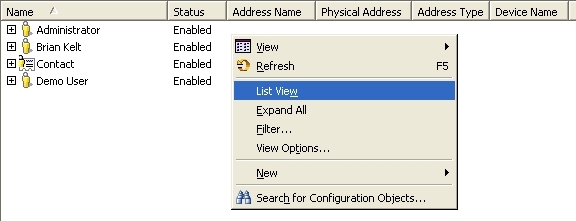
  5. Right-click in the right pane and choose 'List View' or 'Expand All'
  6. Review the list of addresses. Delete any addresses with the device to be deleted in the 'Device Name' column.

After all dependent address objects have been removed, re-attempt deletion of the device.


Comment

0 comments

Details

Knowledge Article

Published:

June 8, 2017

Last Updated:

June 8, 2017