When exporting a report to Excel, Strategy Web sends the report name to the client browser in an HTTP header called "content-disposition".
You can actually see the value of that header using Fiddler:
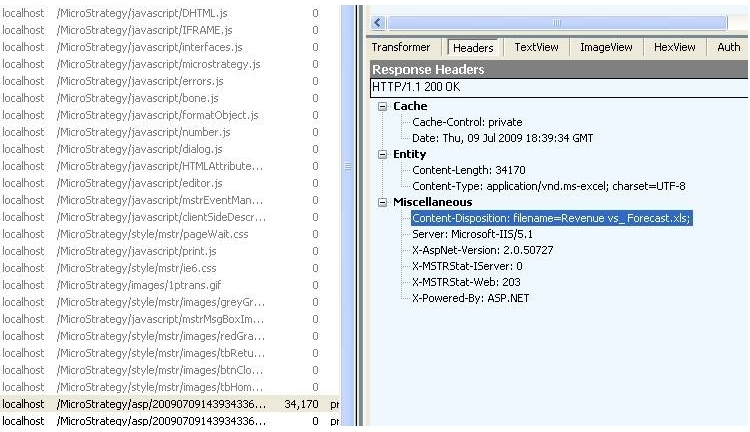
There is a Microsoft defect where Excel reports do not open in a browser window when the report name, along with the path of the client temp folder, exceeds 218 characters.
According to Microsoft in KB article 416351:
"This problem occurs if the file or the path name is longer than 255 characters. If the file or the path name is longer than 255 characters, the file cannot be located on a URL Web address.
Additionally, Microsoft Office programs have a limitation for the total length of the path and the file name. The combined length cannot be more than 218 characters.”
Therefore, the value of the header variable "content-disposition” and the path of the temp folder for the client machine cannot exceed 218 characters.
To send the report name of double-byte character languages, Strategy encodes the value of the variable "content-disposition”. In this variable the "filename=” portion and the extension of the file ".xls” are a constant 13 characters. There is also the path of the temp folder as specified in Internet Explorer. In the example below, "C:\Documents and Settings\user\Local Settings\Temporary Internet Files" accounts for another 71 characters.
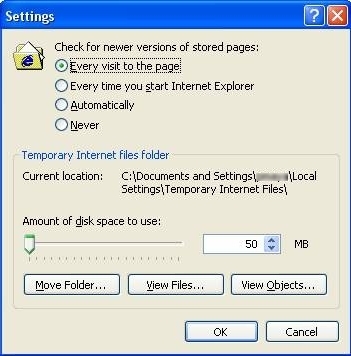
Out of the 218 character limit, 84 characters (71+13) have been used, leaving 129 characters for the report name.
To avoid encountering the Microsoft defect, Strategy allows 100 character report names. This value is conservative enough to prevent the Microsoft issue and takes into consideration that the temp path may vary in size.
When the report name is in double-byte encoded language such as Chinese, Korean, or Japanese, MicroSrategy encodes the report name. Most Japanese characters are encoded using nine single byte characters. Our allowance of 100 characters translates to 11 Japanese characters.
In Strategy 2019 Update 2 or higher, the double-byte character limit for filenames has been increased to 100, instead of 11, for Chinese, Korean, and Japanese. Upgrade to Strategy 2019 Update 2 to take advantage of this fix.
Third Party Software Installation WARNING
The third-party product(s) discussed in this technical note is manufactured by vendors independent of Strategy. Strategy makes no warranty, express, implied or otherwise, regarding this product, including its performance or reliability.
KB31090
