Organizations commonly use fiscal calendars of 13-week quarters, each containing three fiscal periods in which two periods have four weeks and one has five. Each fiscal period starts on the same day of the week, unlike the Gregorian calendar, and has the same number of days. This simplifies period-over-period transformations, among other benefits.
In general, the assignment of dates into fiscal periods should be handled in lookup or relationship tables, so that the calendar can be tailored to the organization's requirements. The use of date functions is not recommended. Database-side date functions are usually tied to the Gregorian calendar, which does not map neatly onto any 4-4-5 scheme. (If a given database platform includes functions designed specifically to manipulate dates according to a 4-4-5 arrangement, those functions could be used in ApplySimple expressions.)
Following are short fragments of fiscal week and fiscal period lookup tables laying out a 4-4-5 scheme where the first day of the fiscal week is Monday.
FISC_WEEK_ID | FISC_WEEK_DESC | FISC_MONTH_ID | FISC_WEEK_START_DT | FISC_WEEK_END_DT |
200601 | 2006 Week 1 | 200601 | 1/2/2006 | 1/8/2006 |
200602 | 2006 Week 2 | 200601 | 1/9/2006 | 1/15/2006 |
200603 | 2006 Week 3 | 200601 | 1/16/2006 | 1/22/2006 |
200604 | 2006 Week 4 | 200601 | 1/23/2006 | 1/29/2006 |
200605 | 2006 Week 5 | 200602 | 1/30/2006 | 2/5/2006 |
200606 | 2006 Week 6 | 200602 | 2/6/2006 | 2/12/2006 |
200607 | 2006 Week 7 | 200602 | 2/13/2006 | 2/19/2006 |
200608 | 2006 Week 8 | 200602 | 2/20/2006 | 2/26/2006 |
200609 | 2006 Week 9 | 200603 | 2/27/2006 | 3/5/2006 |
200610 | 2006 Week 10 | 200603 | 3/6/2006 | 3/12/2006 |
200611 | 2006 Week 11 | 200603 | 3/13/2006 | 3/19/2006 |
200612 | 2006 Week 12 | 200603 | 3/20/2006 | 3/26/2006 |
200613 | 2006 Week 13 | 200603 | 3/27/2006 | 4/2/2006 |
FISC_MONTH_ID | FISC_MONTH_DESC | FISC_MONTH_START_DT | FISC_MONTH_END_DT |
200601 | 2006 Period 1 | 1/2/2006 | 1/29/2006 |
200602 | 2006 Period 2 | 1/30/2006 | 2/26/2006 |
200603 | 2006 Period 3 | 2/27/2006 | 4/2/2006 |
200604 | 2006 Period 4 | 4/3/2006 | 4/30/2006 |
200605 | 2006 Period 5 | 5/1/2006 | 5/28/2006 |
200606 | 2006 Period 6 | 5/29/2006 | 7/2/2006 |
With the weeks and months arranged in database tables, a fiscal date table could be created physically in the database, or established with a view based on a calendar date lookup table, as follows:
create view LU_FISC_DAY as
select a1.DAY_DATE FISC_DAY_DATE,
a2.FISC_WEEK_ID,
a3.FISC_MONTH_ID
from LU_DAY a1
join LU_FISC_WEEK a2
on (a1.DAY_DATE between a2.FISC_WEEK_START_DT and a2.FISC_WEEK_END_DT)
join LU_FISC_MONTH a3
on (a2.FISC_MONTH_ID = a3.FISC_MONTH_ID)
Attributes may then be created in a simple chain of one-to-many relationships. Note that the start and end date columns are brought into the Fiscal Month and Fiscal Week attributes as attribute forms coming from their respective lookup tables. Fiscal Semester and Fiscal Year attributes may be modeled similarly.

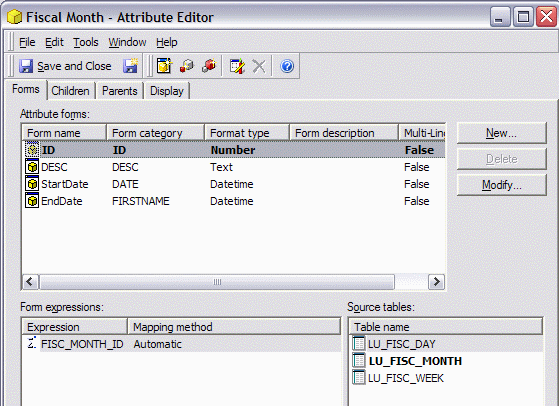
With start and end date columns in the lookup tables, it is possible to use database views or MicroStrategy logical views to create week-to-date or period-to-date transformation tables. An example follows of a MicroStrategy logical view defining a fiscal month to date transformation using the above-described tables. It is necessary to join LU_FISC_DAY twice in the from clause because the table must map one date onto multiple other dates.
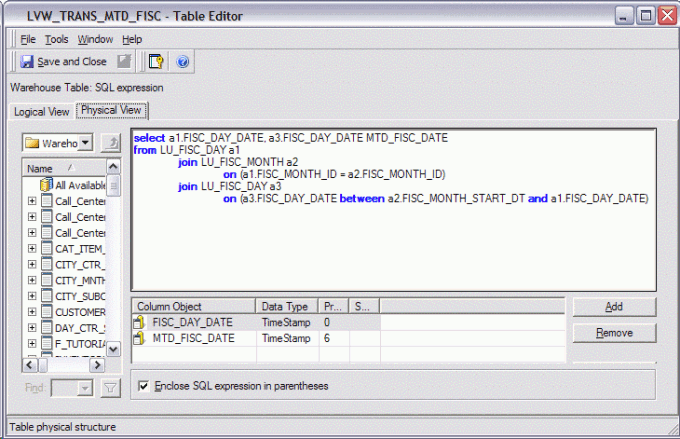
select a1.FISC_DAY_DATE, a3.FISC_DAY_DATE MTD_FISC_DATE
from LU_FISC_DAY a1
join LU_FISC_MONTH a2
on (a1.FISC_MONTH_ID = a2.FISC_MONTH_ID)
join LU_FISC_DAY a3
on (a3.FISC_DAY_DATE between a2.FISC_MONTH_START_DT and a1.FISC_DAY_DATE)
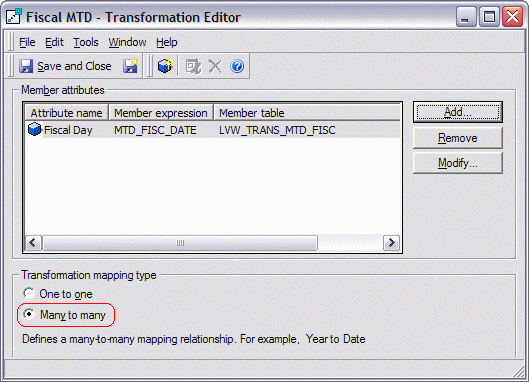
The transformation should then be defined as many-to-many:
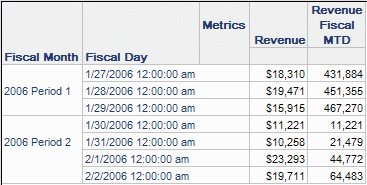
Results:
Common reporting scenario #2: Filtering on days in a fiscal period up to a user-selected date
This requirement effectively consists of two criteria:
1: Include days before and including the user's selection
