EducationSoftwareStrategy.com
StrategyCommunity

Knowledge Base

Product

Community

Knowledge Base

TopicsBrowse ArticlesDeveloper Zone

Product

Download SoftwareProduct DocumentationSecurity Hub

Education

Tutorial VideosSolution GalleryEducation courses

Community

GuidelinesGrandmastersEvents
x_social-icon_white.svglinkedin_social-icon_white.svg
Strategy logoCommunity

© Strategy Inc. All Rights Reserved.

LegalTerms of UsePrivacy Policy
  1. Home
  2. Topics

KB31096: How to import a Windows NT group and its users into MicroStrategy in the MicroStrategy Developer 9.x


Stefan Zepeda

Salesforce Solutions Architect • Strategy


How to import a Windows NT group and its users into MicroStrategy in the MicroStrategy Developer 9.x

The Strategy Developer 9.x allow for groups, and the users belonging to the groups, to be imported from the Windows NT domain into the Strategy metadata. Users can import the users and groups in the following manner . 

  • Users can right mouse click on the 'User Manager' tab in Strategy Developer as shown below, and navigate to the 'Import' pop up list and select the menu item 'Windows Group':
     
ka02R000000kbnhQAA_0EM440000002EMp.jpeg
  • A dialog box will open and is populated with the various user groups from the current Windows NT domain. Users can click on the ">" button to import a group and the users belonging to that group into the Strategy metadata:
     
ka02R000000kbnhQAA_0EM440000002EMr.jpeg
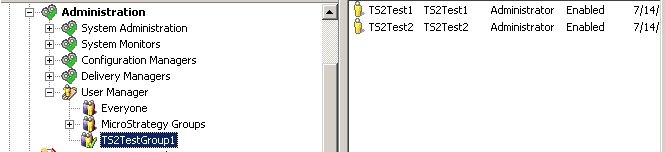
  • After clicking on the "OK" button, the users and groups are imported into the Strategy metadata and appear as regular Strategy Users and Groups. The user membership in Strategy is to the same groups they belonged to in the Windows NT domain when they are imported.
     
ka02R000000kbnhQAA_0EM440000002EMs.jpeg

Note: Users should note that once the users and groups are imported into Strategy, there is no link maintained between the Strategy metadata and the user/group membership in the Windows NT domain. Any changes to user and group memberships will not affect the users and groups in Strategy. Also users can be assigned different group memberships in Strategy after they have been imported in the usual manner.


Comment

0 comments

Details

Knowledge Article

Published:

June 8, 2017

Last Updated:

June 8, 2017