EducationSoftwareStrategy.com
StrategyCommunity

Knowledge Base

Product

Community

Knowledge Base

TopicsBrowse ArticlesDeveloper Zone

Product

Download SoftwareProduct DocumentationSecurity Hub

Education

Tutorial VideosSolution GalleryEducation courses

Community

GuidelinesGrandmastersEvents
x_social-icon_white.svglinkedin_social-icon_white.svg
Strategy logoCommunity

© Strategy Inc. All Rights Reserved.

LegalTerms of UsePrivacy Policy
  1. Home
  2. Topics

KB31133: Join conditions are omitted in the calculation of nested aggregation metrics in MicroStrategy SQL Generation Engine


Community Admin

• Strategy


This article notes a scenario about how join conditions work with nested aggregation metrics

SYMPTOM
A user builds a report using a nested aggregation, as illustrated below.
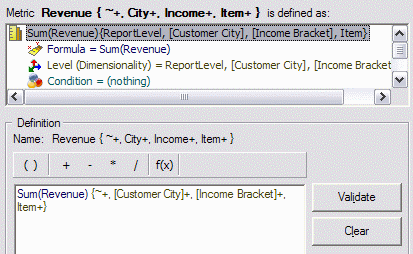
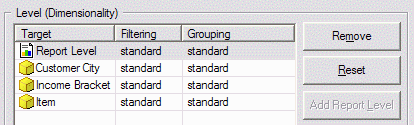
Metric definition for inner aggregation, at Customer City, Income Bracket and Item level:
ka04W000000OfAaQAK_0EM440000002EM0.gif


ka04W000000OfAaQAK_0EM440000002EM7.gif

 
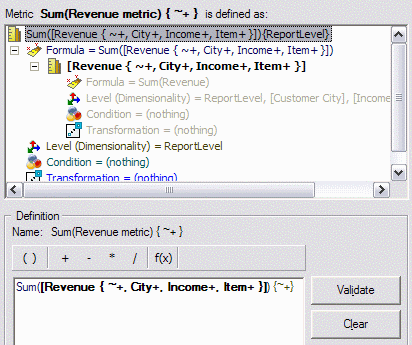
Metric definition for outer aggregation, at report level:
ka04W000000OfAaQAK_0EM440000002EM4.gif

 
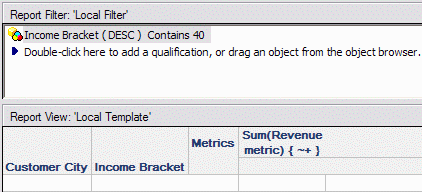
Report definition:

ka04W000000OfAaQAK_0EM440000002EM1.gif

 
Customer City and Income Bracket use a dimension table for their primary lookup. The two attributes are not directly related to each other; instead, they are connected by way of the common child attribute Customer. (This example uses a Logical View based on a SQL statement; a physical warehouse table or database view could also be used.)
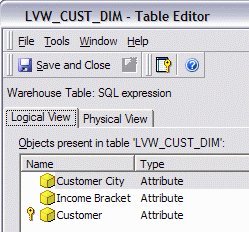
 

ka04W000000OfAaQAK_0EM440000002EMG.gif

 
The report produces results such as the following, with two data problems:
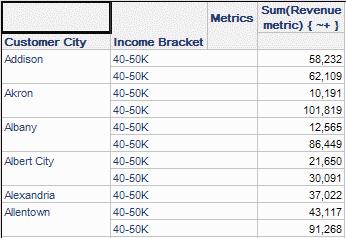
  • The report filter matches two Income Bracket elements, 30-40K and 40-50K, but 40-50K is repeated for each Customer City.
  • The metric values are highly inflated.
ka04W000000OfAaQAK_0EM440000002ELy.gif


CAUSE
Two factors contribute to this problem:

  1. The key attributes on the intermediate table for the inner level of aggregation (Customer City and Income Bracket) are different from the dimension table's key (Customer). A VLDB property change can reintroduce the missing attribute into the join conditions.
  2. The dimension table exists at a lower level of granularity (higher cardinality) than the innermost metric aggregation. This is a data modeling issue that can be addressed by adjusting the inner metric's dimensionality or providing a distinct lookup table for each attribute.

1. Key mismatch between tables to be joined
When Strategy SQL Generation Engine tries to identify the common key to join the tables in the final pass, the mismatch between the keys causes the Engine to join on only one attribute (Customer City). This causes multiple counting in the report level aggregation, and also the discrepancy between the Income Bracket IDs and descriptions.
 
select a11.ITEM_ID  ITEM_ID,
  a12.INCOME_ID  INCOME_ID,
  a12.CUST_CITY_ID  CUST_CITY_ID,
   sum((a11.QTY_SOLD * (a11.UNIT_PRICE - a11.DISCOUNT)))  WJXBFS1
into #ZZMD00
from ORDER_DETAIL a11
   join LVW_CUST_DIM a12
      on  (a11.CUSTOMER_ID = a12.CUSTOMER_ID)
where a12.BRACKET_DESC like '%40%'
group by a11.ITEM_ID,
   a12.INCOME_ID,
   a12.CUST_CITY_ID
 
select pa11.CUST_CITY_ID  CUST_CITY_ID,
   max(a12.CUST_CITY_NAME)  CUST_CITY_NAME,
   pa11.INCOME_ID  INCOME_ID,
   max(a12.BRACKET_DESC)  BRACKET_DESC0,
   sum(pa11.WJXBFS1)  WJXBFS1
from #ZZMD00 pa11
   join LVW_CUST_DIM a12
      on  (pa11.CUST_CITY_ID = a12.CUST_CITY_ID)
where a12.BRACKET_DESC like '%40%'
group by pa11.CUST_CITY_ID,
   pa11.INCOME_ID
 
The VLDB Property "Attribute to join when key from neither side can be supported by the other side," under the Joins folder in the VLDB Property editor, controls the Engine's logic to determine which attributes to include in the join condition. The default setting is "Join common key on both sides." This option produces more efficient SQL by joining only the lowest level attributes in their respective hierarchies. For instance, assuming a one-to-many relationship between Month and Quarter, an intermediate table containing Month and Quarter IDs would join to another table containing the same IDs based only on Month ID. In normal data modeling scenarios, the results are correct and the SQL is simpler.
 
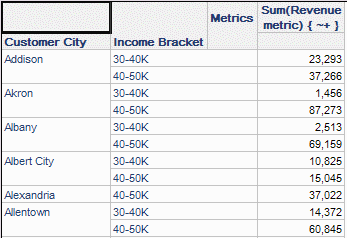
In this case, it is not sufficient to join only on Customer City. Changing the "Attribute to join..." property to the second option, "Join common attributes (reduced) on both sides," will consider both Customer City and Income Bracket in the join because both attributes exist in common between the two tables (even though neither is a key attributes in the dimension table).
 
With this change, the Income Bracket elements display correctly in the report. But the metric values are still inflated, because of the second issue.
 

ka04W000000OfAaQAK_0EM440000002EM5.gif

 
select a11.ITEM_ID  ITEM_ID,
   a12.INCOME_ID  INCOME_ID,
   a12.CUST_CITY_ID  CUST_CITY_ID,
   sum((a11.QTY_SOLD * (a11.UNIT_PRICE - a11.DISCOUNT)))  WJXBFS1
into #ZZMD00
from ORDER_DETAIL a11
   join LVW_CUST_DIM a12
      on  (a11.CUSTOMER_ID = a12.CUSTOMER_ID)
where a12.BRACKET_DESC like '%40%'
group by a11.ITEM_ID,
   a12.INCOME_ID,
   a12.CUST_CITY_ID
 
select pa11.CUST_CITY_ID  CUST_CITY_ID,
   max(a12.CUST_CITY_NAME)  CUST_CITY_NAME,
   pa11.INCOME_ID  INCOME_ID,
   max(a12.BRACKET_DESC)  BRACKET_DESC0,
   sum(pa11.WJXBFS1)  WJXBFS1
from #ZZMD00 pa11
   join LVW_CUST_DIM a12
      on  (pa11.CUST_CITY_ID = a12.CUST_CITY_ID and
          pa11.INCOME_ID = a12.INCOME_ID)
where a12.BRACKET_DESC like '%40%'
group by pa11.CUST_CITY_ID,
   pa11.INCOME_ID
 
2. Dimension table is at a lower level than the intermediate table
The dimension table contains unique rows per Customer, but the rows are not unique at the level of the intermediate table. That is, it would be expected to find more than one customer per city and income bracket. Therefore, joining the lower-level metric results to the dimension table based on the parent attributes will again result in multiple counting, because one City-Income level metric value will be replicated for every customer in that city and income bracket.
 
Therefore it is not a complete solution in this scenario to change the "Attribute to join..." VLDB property.
 
ACTION
The problem may be addressed in one of two ways:
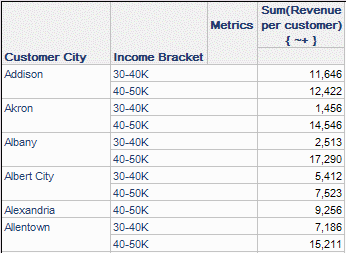
  • Modify the inner metric's dimensionality to include one or more key attributes from the dimension table. Calculating the inner metric at Customer level allows the engine to join the two tables on Customer, eliminating all multiple counting from this report.

ka04W000000OfAaQAK_0EM440000002EM6.gif
  •  
    select a11.ITEM_ID  ITEM_ID,
       a11.CUSTOMER_ID  CUSTOMER_ID,
       sum((a11.QTY_SOLD * (a11.UNIT_PRICE - a11.DISCOUNT)))  WJXBFS1
    into #ZZMD00
    from ORDER_DETAIL a11
       join LVW_CUST_DIM a12
          on  (a11.CUSTOMER_ID = a12.CUSTOMER_ID)
    where a12.BRACKET_DESC like '%40%'
    group by a11.ITEM_ID,
       a11.CUSTOMER_ID
     
    select a12.CUST_CITY_ID  CUST_CITY_ID,
       max(a12.CUST_CITY_NAME)  CUST_CITY_NAME,
       a12.INCOME_ID  INCOME_ID,
       max(a12.BRACKET_DESC)  BRACKET_DESC0,
       sum(pa11.WJXBFS1)  WJXBFS1
    from #ZZMD00 pa11
       join LVW_CUST_DIM a12
          on  (pa11.CUSTOMER_ID = a12.CUSTOMER_ID)
    where a12.BRACKET_DESC like '%40%'
    group by a12.CUST_CITY_ID,
       a12.INCOME_ID
     
    Note that this could alter the results of functions such as Average or Standard Deviation. If the inner metric's level cannot be changed for this reason, the only alternative is to provide distinct lookup tables.
     
  • Create distinct lookup tables for each attribute. This is a standard data modeling technique for star schemas where summary fact tables are to be used.
     
    Nested aggregation creates an intermediate table at the level of the inner aggregation. Effectively, this is no different from a summary fact table; thus, the same considerations apply. Consult the following Strategy Knowledgebase document for further information about star schemas. 

    KB19194: Considerations for the use of star schemas with Strategy SQL Generation Engine

     The SQL with distinct lookup tables is as follows.

    select a11.ITEM_ID  ITEM_ID,
       a12.INCOME_ID  INCOME_ID,
       a12.CUST_CITY_ID  CUST_CITY_ID,
       sum((a11.QTY_SOLD * (a11.UNIT_PRICE - a11.DISCOUNT)))  WJXBFS1
    into #ZZMD00
    from ORDER_DETAIL a11
       join LWV_CUST_DIM a12
          on  (a11.CUSTOMER_ID = a12.CUSTOMER_ID)
    where a12.BRACKET_DESC like '%40%'
    group by a11.ITEM_ID,
       a12.INCOME_ID,
       a12.CUST_CITY_ID
     
    select pa11.CUST_CITY_ID  CUST_CITY_ID,
       max(a12.CUST_CITY_NAME)  CUST_CITY_NAME,
       pa11.INCOME_ID  INCOME_ID,
       max(a13.BRACKET_DESC)  BRACKET_DESC0,
       sum(pa11.WJXBFS1)  WJXBFS1
    from #ZZMD00 pa11
       join LU_CUST_CITY a12       on  (pa11.CUST_CITY_ID = a12.CUST_CITY_ID)
       join LU_INCOME a13       on  (pa11.INCOME_ID = a13.INCOME_ID)
    where a13.BRACKET_DESC like '%40%'
    group by pa11.CUST_CITY_ID,
       pa11.INCOME_ID


Comment

0 comments

Details

Knowledge Article

Published:

June 1, 2017

Last Updated:

June 1, 2017