As of Strategy SQL Generation Engine 9.x, a VLDB property called "Transformation Formula Optimization" is available to improve the efficiency of some types of expression-based transformations.
Two types of transformations exist in Strategy SQL Generation Engine: table-based and expression-based. Table-based transformations obtain the transformed attribute ID value from a designated column in the attribute's lookup table, or in a separate transformation table. For instance, the "Previous" transformation in the Strategy Tutorial project identifies the previous month for a given month from the PREV_MONTH_ID column in LU_MONTH.
An expression-based transformation maps an attribute ID form onto the result of math operations on the original attribute ID column. A transformation for "Two Years Ago" could be defined as YEAR_ID - 2.

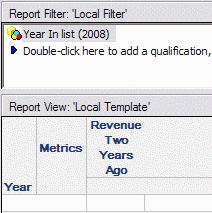
Prior to Strategy SQL Generation Engine 9.x-10.x, a metric calculation at Year level using this transformation would require an additional join to the table identified in the transformation definition, solely to resolve the transformation.
select a12.YEAR_ID YEAR_ID,
sum(a11.TOT_DOLLAR_SALES) WJXBFS1
from YR_CATEGORY_SLS a11
join LU_YEAR a12
on (a11.YEAR_ID = (a12.YEAR_ID - 2))
where a12.YEAR_ID in (2008)
group by a12.YEAR_ID
The Transformation Formula Optimization avoids the transformation table join by inverting the operation(s) in the expression if possible, and using the inversion in the SELECT and GROUP BY clauses. Also, if the transformed attribute is used in the filter, the operation will be applied to the element IDs in the qualification.
select (a11.YEAR_ID + 2) YEAR_ID,
sum(a11.TOT_DOLLAR_SALES) WJXBFS1
from YR_CATEGORY_SLS a11
where a11.YEAR_ID in ((2008 - 2))
group by (a11.YEAR_ID + 2)
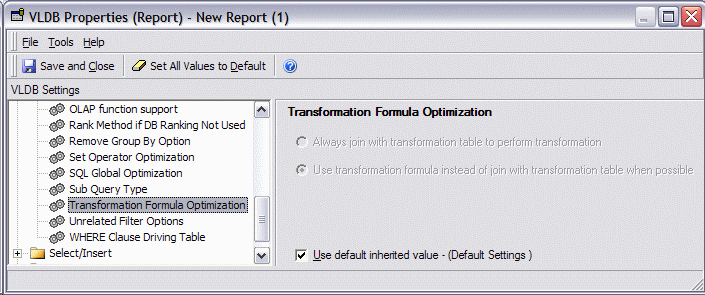
The optimization is enabled by default in Strategy 9.x-10.x projects. It is controlled in the VLDB Property Editor under Query Optimizations > Transformation Formula Optimization.
Rationale
According to standard transformation behavior, the example report should display the Year element(s) chosen in the report filter, but present metric values according to the transformation, showing 2006 data alongside 2008 in the grid. Without the optimization, the 2008 element for display and filtering comes from the transformation table, and the join between the fact table and transformation table Fact.YEAR_ID = (Transformation.YEAR_ID - 2) maps the display element onto the desired fact rows. The same result can be obtained directly from the fact table by filtering the fact table rows on 2008 - 2 = 2006, while selecting the fact table's YEAR_ID + 2, by which 2006 in the fact table becomes 2008 to display on the report.
The optimization takes effect when an inverse formula can be determined: if y = x - 2, then x = y + 2. If the operations are not associative, the optimization will not be applied. For instance, the formula for the Quarter two years ago, ((( / 10.0) - 2.0) * 10.0), uses addition, multiplication and division. Multiplication and division are associative with each other, but not with addition. Therefore, SQL for this transformation against Quarter will always join to the transformation table, even if the optimization is enabled in the VLDB Properties. (To illustrate, the description form was removed from this report so that the join to LU_QUARTER is only for the transformation.)
select a12.QUARTER_ID QUARTER_ID,
sum(a11.TOT_DOLLAR_SALES) WJXBFS1
from QTR_CATEGORY_SLS a11
join LU_QUARTER a12
on (a11.QUARTER_ID = (((a12.QUARTER_ID / 10) - 2) * 10))
where a12.QUARTER_ID in (20084)
group by a12.QUARTER_ID
If the Quarter-level transformation used the simpler formula - 20, the optimization would be valid.
Notes
