SYMPTOM:
When configuring an asymmetrical cluster (different number of projects loaded on each node) of Strategy 2021 Intelligence Server, the following error message is seen:

Server failed to join cluster. This server is not compatible with remote server XXX: either the list of the registered projects used by this server do not match those of the remote server, their communication protocols are not the same, or server version does not match.

CAUSE:
This is working as designed. To cluster Node A and Node B, the user must first use Strategy Configuration Wizard to configure Node A and Node B with the same server definition and select the same number of projects. Once the cluster is formed, the user can then go to a special interface (described below) to set up asymmetrical clustering i.e. loading of different projects on each node.
ACTION:
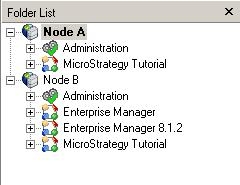
Once the cluster is formed, go to Configure Strategy Intelligence Server ->Projects. For each Node, select the projects to be loaded. As seen below, Node B is set to load 3 projects while Node A is set to load only 1 project.

Note: 'Apply startup configuration on save' must be checked for the above changes to remain the same after every subsequent Intelligence Server startup.
For additional details on how to set up asymmetrical clustering, refer to the following Strategy Knowledge Base article below:
KB17253 - What are the steps to follow to setup the server definition for asymmetrical clustering?
