To correctly set up connectivity to Microsoft Access database with workgroup file (user and group authentication information stored in system.mdw file) the following steps must be followed:
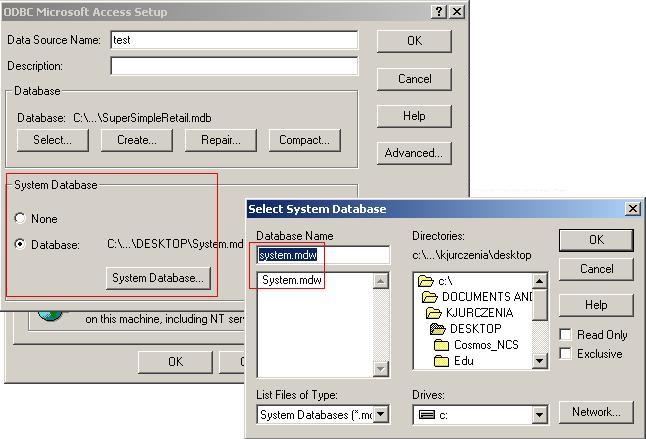
1. Create DSN (Data source name) as shown on image below. Note, that system database must be included in DSN information. Otherwise, anonymous access will be possible.
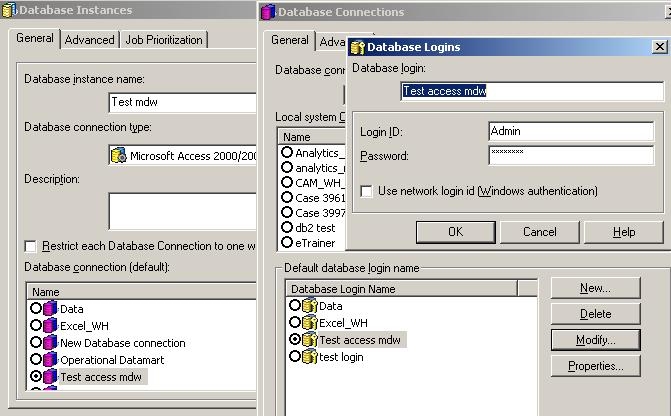
2. Create appropriate connection information in Strategy. In order to do this, one must define correct Connection Information and Database Login objects in Database Instance like shown on screenshot below:
Now connectivity should be set up correctly. When user tries to login with incorrect login or password, the following error message will appear:
Sample Code/Error
Connect failed. Error type: Odbc error. Odbc operation attempted: SQLDriverConnect. Not a valid account name or password.
NOTE:
Microsoft Access databases are supported and certified only for demonstration purposes. Strategy does not support Access databases in production environments.
