Strategy 9.x adds a new setting to remove the extra column that is displayed for the Metrics column when running a report in Strategy Web.
In Strategy Desktop it is called "Remove extra column (Web only)" and can be found when running the report under "Grid" menu, "Options", "Columns and Rows" tab:

In Strategy Web. this setting is in "Tools" Menu, "Reports Options":

If this option is disabled, the report would look like as follows:
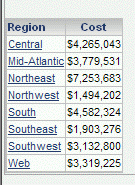
However, if the user checks this parameter, the report would be as below:

As may be noticed, when running the report in Strategy Web, the "metrics" word will be also removed. However, there are some cases in which this will not occur. For instance, when an attribute is inserted under the metric in the columns.
An example with Strategy Tutorial with the "Remove extra column" setting enabled would be as the screenshot below:

If the parameter is unchecked, the report is displayed this way:
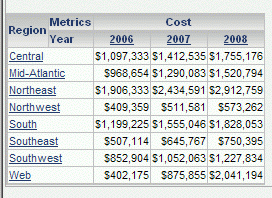
Some users may expect that the "metrics" is hidden when this parameter is enabled but this is working as designed. This setting only removes the column, not the "metrics" word.
There is an enhancement request logged with Technology to remove also the "metrics" word. Please contact Technical Support for an update on this request.
If desired to remove "Metrics" display completely from all of the report, please refer to:
