EducationSoftwareStrategy.com
StrategyCommunity

Knowledge Base

Product

Community

Knowledge Base

TopicsBrowse ArticlesDeveloper Zone

Product

Download SoftwareProduct DocumentationSecurity Hub

Education

Tutorial VideosSolution GalleryEducation courses

Community

GuidelinesGrandmastersEvents
x_social-icon_white.svglinkedin_social-icon_white.svg
Strategy logoCommunity

© Strategy Inc. All Rights Reserved.

LegalTerms of UsePrivacy Policy
  1. Home
  2. Topics

KB311782: Disabling security setting „Session information is included on the URL” in Microstrategy 9.x in Web Administrator disables the possibility to edit attribute form in selector.


Community Admin

• Strategy


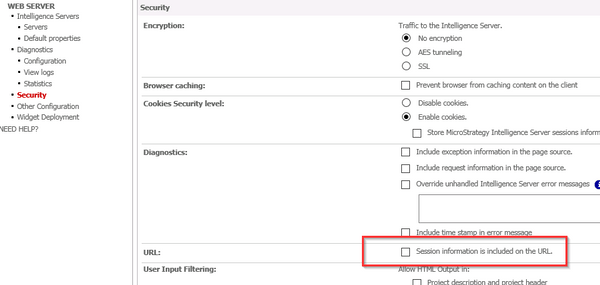
When in Web Administrator, in Security section, the setting „Session information is included on the URL” is disabled, editing the form of attribute in selector is no longer possible.

SYMPTOM:
When in Web Administrator, in Security section, the setting „Session information is included on the URL” is disabled as per screenshot below, editing the form of attribute in selector is no longer possible.
 

ka04W000000OfqxQAC_0EM4400000025NI.jpeg


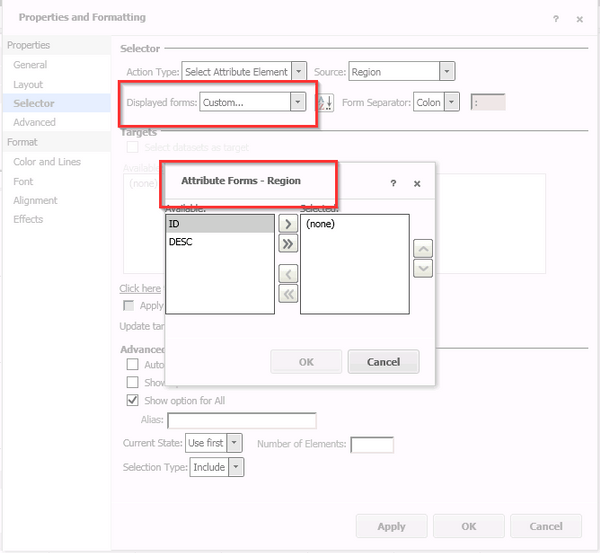
There is no error message visible. However, when User enables the setting the information window as below occurs:
 

ka04W000000OfqxQAC_0EM4400000025NG.jpeg

 
CAUSE:
This is a known issue in MicroStartegy 9.
 
ACTION:
Issues has been fixed in Strategy 10. Please, upgrade to take an advantage of the fix.


Comment

0 comments

Details

Knowledge Article

Published:

June 13, 2017

Last Updated:

July 17, 2017