EducationSoftwareStrategy.com
StrategyCommunity

Knowledge Base

Product

Community

Knowledge Base

TopicsBrowse ArticlesDeveloper Zone

Product

Download SoftwareProduct DocumentationSecurity Hub

Education

Tutorial VideosSolution GalleryEducation courses

Community

GuidelinesGrandmastersEvents
x_social-icon_white.svglinkedin_social-icon_white.svg
Strategy logoCommunity

© Strategy Inc. All Rights Reserved.

LegalTerms of UsePrivacy Policy
  1. Home
  2. Topics

KB311838: Behavior differences between unit condition (apply as filter) selector and slicing selector


Community Admin

• Strategy


MicroStrategy supports two types of selector in a document. With Unit condition selectors (UC), the current selections of the selector are applied as a filter and only the selected data is loaded. By default, the current status is unset (no filter). With Slicing selectors, all the data is loaded and the elements chosen in the selector(s) are used to slice the data.

Strategy supports two types of selector in document:
1.Unit condition selector (UC): The option "Apply selections as a filter". The current selections of the selector are applied as a filter and only the selected data is loaded from the underlying dataset. By default, the current status is unset (no filter). 
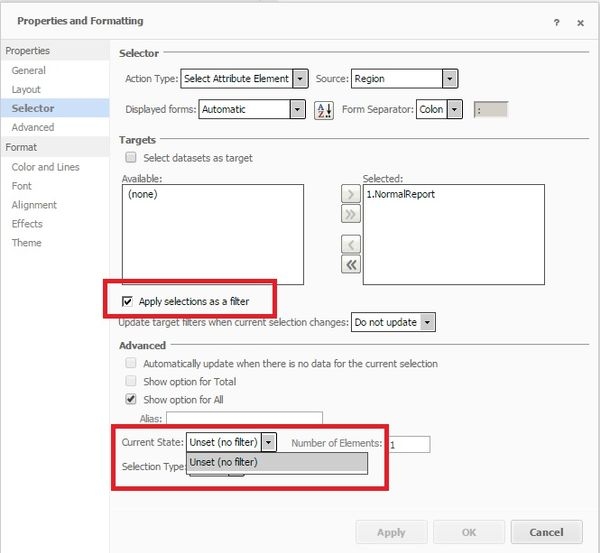
ka04W000000OgQyQAK_0EM4400000029Ar.jpeg


  1. Slicing selector: All the data is loaded and the elements chosen in the selector are used to slice the data.

Uncheck "Apply selections as a filter". By Default, we can have "Use First" or "Use Last" as Current Status.
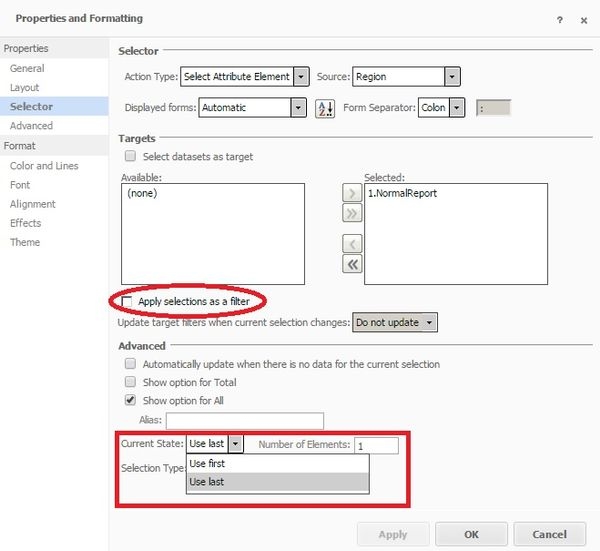
ka04W000000OgQyQAK_0EM4400000029Al.jpeg

 
There are several behavior differences between UC selector and slicing selector:
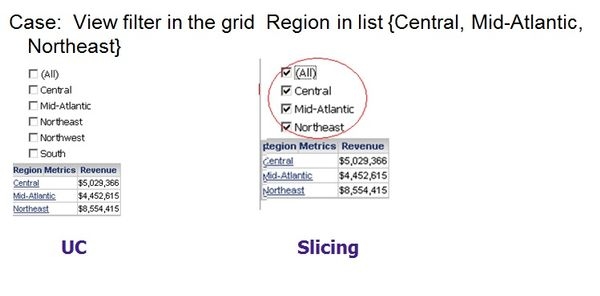
  1. View filter
  • UC selector: The element list is coming from dataset. Target has view filter doesn't affect the element list for UC selector
  • Slicing selector: The element list is trimmed by the target. 
ka04W000000OgQyQAK_0EM4400000029Ak.jpeg
  1. Out of level aggregation
  • UC selector: Rows from multiple individual attribute elements selections are aggregated when using UC selector
  • Slicing selector: Rows from multiple individual attribute elements selections are NOT aggregated when using slicing selector 
ka04W000000OgQyQAK_0EM4400000029An.jpeg

3. Smart/Derived metric

  • UC selector: smart/derived metric will be recalculated in the grid
  • Slicing selector: smart/derived metric was calculated before the slicing and won't be recalculated in the grid.
ka04W000000OgQyQAK_0EM4400000029Ai.jpeg

4. Subtotal in grid

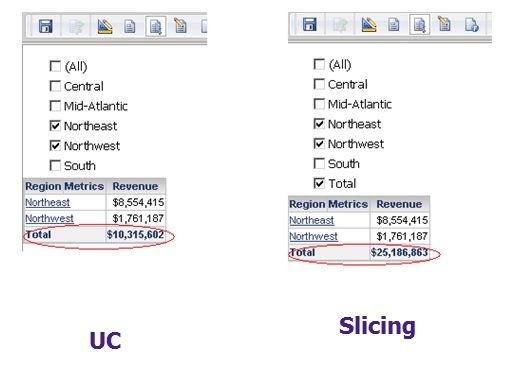
  • UC selector: Doesn't support Total on UC, but Total in grid can aggregate over selections
  • Slicing selector: Total is supported, which is a subtotal over all slices
ka04W000000OgQyQAK_0EM4400000029Ag.jpeg

 
In addition to the behavior differences, the performances between UC and slicing selector are also different. With slicing selector, usually the first time execution is slower but the manipulation such as changing selections is quicker. With UC selector, the execution is quicker but the manipulation usually takes longer time than slicing selector.


Comment

0 comments

Details

Knowledge Article

Published:

May 17, 2017

Last Updated:

July 17, 2017