EducationSoftwareStrategy.com
StrategyCommunity

Knowledge Base

Product

Community

Knowledge Base

TopicsBrowse ArticlesDeveloper Zone

Product

Download SoftwareProduct DocumentationSecurity Hub

Education

Tutorial VideosSolution GalleryEducation courses

Community

GuidelinesGrandmastersEvents
x_social-icon_white.svglinkedin_social-icon_white.svg
Strategy logoCommunity

© Strategy Inc. All Rights Reserved.

LegalTerms of UsePrivacy Policy
  1. Home
  2. Topics

KB31184: The watermark text of Report Services Document cannot be displayed in double-byte (Japanese, Korean, Simplified Chinese, Traditional Chinese) characters in MicroStrategy Developer 9.4.1 and 10.x


Stefan Zepeda

Salesforce Solutions Architect • Strategy


The watermark text of Report Services Document cannot be displayed in double-byte (Japanese, Korean, Simplified Chinese, Traditional Chinese) characters in MicroStrategy Desktop 9.4.1 and 10.x

SYMPTOM
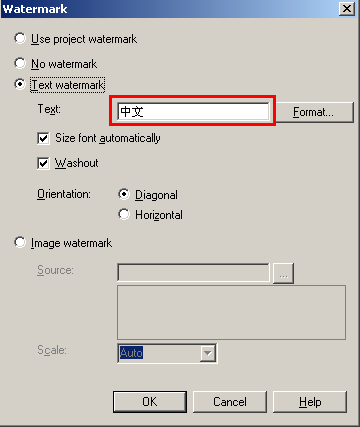
In Strategy Developer 9.4.1 and 10.x, the watermark of Report Services Document cannot be displayed in double-byte characters(Japanese, Korean, Simplified Chinese, Traditional Chinese)  even after the user inputs double-byte characters for watermark text, as shown below:
ka02R000000kc8BQAQ_0EM440000002ELB.png

 
CAUSE
The font that supports the corresponding double-byte characters (Japanese, Korean, Simplified Chinese, Traditional Chinese) is not selected for watermark text.
 
ACTION
Follow the steps below to display watermark text  in double-byte characters for Report Services Documents:
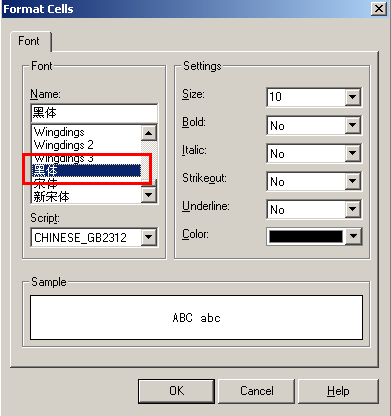
 

  • Open the Report Services Document in design mode and go to Format menu -> Document Properties -> Watermark -> Format. Select a font which supports corresponding double-byte (e.g. Simplified Chinese), as shown below: 
     
ka02R000000kc8BQAQ_0EM440000002EL8.png
  • Run the Report Services Document in PDF format, the watermark can be displayed in double-byte characters, as shown below:
     
ka02R000000kc8BQAQ_0EM440000002EL7.png

NOTE: If no double-byte fonts are installed for Adobe PDF on the Developer machine, the users need to install it first.


Comment

0 comments

Details

Knowledge Article

Published:

May 25, 2017

Last Updated:

May 25, 2017