EducationSoftwareStrategy.com
StrategyCommunity

Knowledge Base

Product

Community

Knowledge Base

TopicsBrowse ArticlesDeveloper Zone

Product

Download SoftwareProduct DocumentationSecurity Hub

Education

Tutorial VideosSolution GalleryEducation courses

Community

GuidelinesGrandmastersEvents
x_social-icon_white.svglinkedin_social-icon_white.svg
Strategy logoCommunity

© Strategy Inc. All Rights Reserved.

LegalTerms of UsePrivacy Policy
  1. Home
  2. Topics

KB311847: The "Next" and "Back" buttons are misaligned in the InstallShield Wizard when installing MicroStrategy 10.4 and 10.5 on Windows when using Display Scaling over 100%


Community Admin

• Strategy


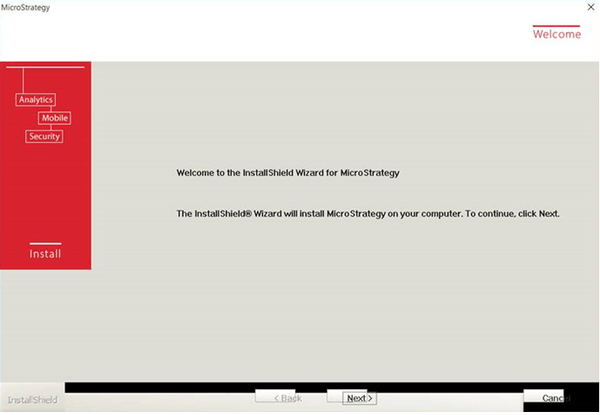
When installing MicroStrategy Secure Enterprise 10.4 or 10.5 on Windows 10, users may notice that the “Back” and “Next” buttons are misaligned in the InstallShield Wizard as seen in the image below. Note that this is a cosmetic issue, and users are still able to proceed with the installation by clicking on the buttons (not the text). 
DESCRIPTION
When installing Strategy Secure Enterprise 10.4 or 10.5 on Windows 10, users may notice that the “Back” and “Next” buttons are misaligned in the InstallShield Wizard as seen in the image below. Note that this is a cosmetic issue, and users are still able to proceed with the installation by clicking on the buttons (not the text). 

ka04W000000OhlEQAS_0EM440000002HDr.jpeg

 
CAUSE
This is a known issue with the InstallShield Wizard in Strategy 10.4 and 10.5 on Windows when using Display Scaling over 100%. 
 
ACTION
The issue can be alleviated by setting the Windows zoom setting to be 100% as seen in the image below:

ka04W000000OhlEQAS_0EM440000002HDq.jpeg

 
After setting the zoom to 100% and restarting the computer, the issue will no longer occur.
 
The Strategy internal reference number for this issue is DE44628


Comment

0 comments

Details

Knowledge Article

Published:

April 15, 2017

Last Updated:

April 15, 2017