EducationSoftwareStrategy.com
StrategyCommunity

Knowledge Base

Product

Community

Knowledge Base

TopicsBrowse ArticlesDeveloper Zone

Product

Download SoftwareProduct DocumentationSecurity Hub

Education

Tutorial VideosSolution GalleryEducation courses

Community

GuidelinesGrandmastersEvents
x_social-icon_white.svglinkedin_social-icon_white.svg
Strategy logoCommunity

© Strategy Inc. All Rights Reserved.

LegalTerms of UsePrivacy Policy
  1. Home
  2. Topics

KB31190: The calendar editor for an Attribute Hierarchy prompt appears offset when using Mozilla Firefox 2.x as the browser when qualifying ong a date attribute in MicroStrategy Web 9.0.0


Community Admin

• Strategy


The calendar editor for an Attribute Hierarchy prompt appears offset when using Mozilla Firefox 2.x as the browser when qualifying ong a date attribute in MicroStrategy Web 9.0.0

SYMPTOM:
 When using Strategy Web 9.0.0 in Mozilla Firefox 2.x, if a user tries to click on the calendar editor to qualify on a date attribute when answering an attribute hierarchy prompt in a report, the calendar editor appears offset inside the browser, as shown below:
 

ka04W000000OgYiQAK_0EM4400000028FY.jpeg

 
STEPS TO REPRODUCE:
 To reproduce the issue in Strategy Tutorial and FireFox 2.x  follow these steps:

  • In Strategy Desktop create five individual attribute element prompts for the attributes of Country, Region, Category, Subcategory, and Item.
     
ka04W000000OgYiQAK_0EM4400000028FG.jpeg
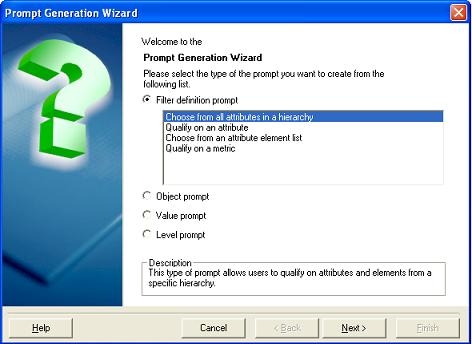
  • Create a Hierarchy prompt and select the Time Hierarchy. Use the `Shopping Cart (Required Search, Qualification)` as the prompt style under Web Options for this prompt.
     
ka04W000000OgYiQAK_0EM4400000028FW.jpeg
ka04W000000OgYiQAK_0EM4400000028FK.jpeg
  • Create a new report.  Add the Time hierarchy to the grid and add the Country, Region, Category, Subcategory, and Item  attributes to the grid.
     
ka04W000000OgYiQAK_0EM4400000028FO.jpeg
  • Add the five attribute element prompts and the Hierarchy prompt  to the filter section.
     
ka04W000000OgYiQAK_0EM4400000028FU.jpeg
  • Go to the Data menu > Prompt Ordering and place the Hierachy prompt at the second position.
     
ka04W000000OgYiQAK_0EM4400000028FI.jpeg
  • Save and close the report.
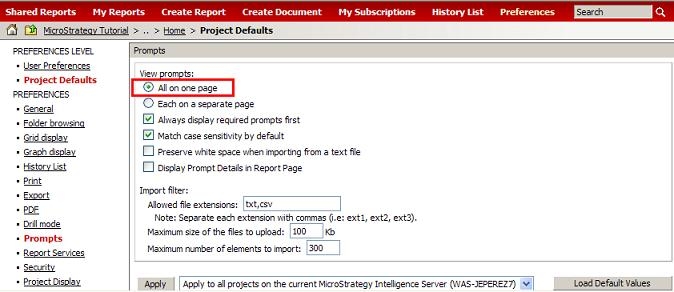
  • In Strategy Web, make sure that all of the prompts are set to be displayed on the same page as shown below:
     
ka04W000000OgYiQAK_0EM4400000028FM.jpeg
  • Execute the prompted report from a Mozilla Firefox 2.x browser and scroll down to the second prompt .
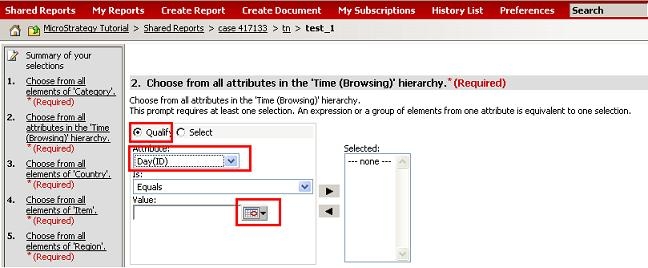
  • Check the Qualify radio button and in the drop down menu select the Day (ID) attribute.
     
ka04W000000OgYiQAK_0EM4400000028FQ.jpeg
  • Click on the calendar day picker to display the Calendar.  Notice how the calendar will be displayed some lines below in the wrong position.
     
ka04W000000OgYiQAK_0EM4400000028FY.jpeg

 
CAUSE:
This is a known issue in Strategy Web 9.0.0 when using Firefox 2.x.
 
ACTION:
This issue is fixed in 9.0.1.


Comment

0 comments

Details

Knowledge Article

Published:

June 14, 2017

Last Updated:

June 14, 2017