SUMMARY:
This technical note documents a connectivity issue that occurs in Strategy Mobile app version 10.x and upper for iOS, after upgrading to iOS 10.
SYMPTOM:
After upgrading a mobile device to iOS version 10, users notice that a connectivity error appears when launching or navigating through the Strategy Mobile app version 10.5 and upper app, as shown below:

Connectivity Error
Could not connect to <server>
1. Open IIS GUI.
2. Click on IIS>Sites>Default Web Site>StrategyMobile as below:
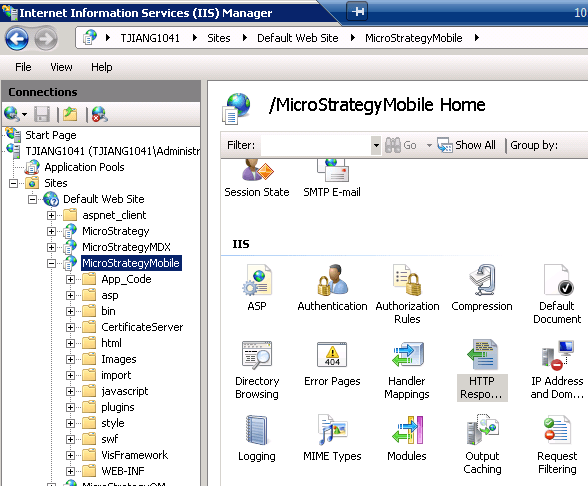
3. Double click on "HTTP Response Headers" as below:

4. Click on "Set Common Headers..." as shown below:

5. Uncheck "Enable HTTP keep-alive" option as shown below:

6. Restart IIS.
Notes: Refer to the following which describes this feature and steps to check whether this is enabled:
https://technet.microsoft.com/en-us/library/cc772183(v=ws.10).aspx
BrowserMatch "MSTRMobile/IPhone" nokeepalive
BrowserMatch "MSTRMobile/IPhone" nokeepalive
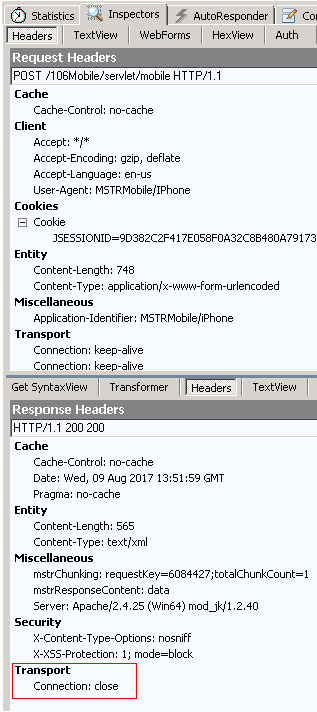
The following two images show how the responses captured by Fiddler look like when Keep alive is enabled or disabled:
Keep alive enabled: Keep alive disabled:

Notes:
If the keep alive option is disabled, a new connection will have to be created for every request to the server. Therefore, there could be a small impact on the performance.
For a similar issue seen in iOS 8, refer to the following Community article:
KB216122: "The session has expired. Go back and run the report again to interact with it" error occurs when running reports in Strategy Mobile 9.4.1 on iOS 8.x
