SYMPTOM:
After opening the Warehouse Catalog, Developer becomes inaccessible but the Warehouse Catalog window does not appear in Strategy 9.x. The user is unable to select the Developer application even though it is open and there is no access to the Warehouse Catalog.
CAUSE:
This can occur if the Warehouse Catalog was previously opened with a dual-monitor set up, moved off of the primary screen, and then closed while the user only has one monitor available during the current session. The previous session's window location is saved in the registry and is not readjusted automatically for the new single-monitor set up. This scenario is most common with users who work and travel with laptops.
ACTION:
This issue can be resolved by resetting some keys in the registry.
In the registry editor, navigate to the following regististry key:
HKEY_CURRENT_USER\Software\Strategy\DSS Agent\WH Catalog Browser
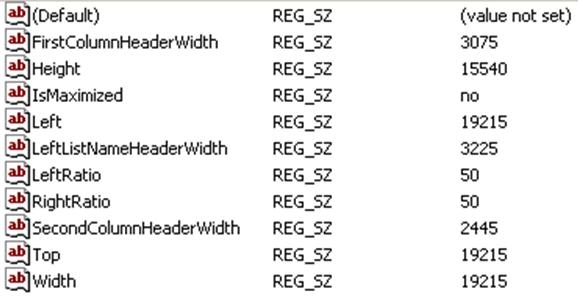
Decrease the values of these keys until the Warehouse Catalog appears over Desktop. Recommend a value between 2000 and 3000. These values affect where the interface is rendered when opening the Warehouse Catalog.
