EducationSoftwareStrategy.com
StrategyCommunity

Knowledge Base

Product

Community

Knowledge Base

TopicsBrowse ArticlesDeveloper Zone

Product

Download SoftwareProduct DocumentationSecurity Hub

Education

Tutorial VideosSolution GalleryEducation courses

Community

GuidelinesGrandmastersEvents
x_social-icon_white.svglinkedin_social-icon_white.svg
Strategy logoCommunity

© Strategy Inc. All Rights Reserved.

LegalTerms of UsePrivacy Policy
  1. Home
  2. Topics

KB312192: How to simulate a union between datasets using the “Group Partition” feature during Data Import in MicroStrategy Web


Huijuan XU

Software Engineer, Principal • MicroStrategy


This article explains how to simulate a union between datasets using the “Group Partition” feature during Data Import in MicroStrategy Web.

Group Partitioning

In certain scenarios, you may want to combine multiple datasets into a single dataset. For example, you may have two sheets in the same Excel project, but you want them to appear in one combined dataset. To accomplish this goal, use Group Partitioning.  
Note: Group Partition is only available when importing data from a Database, the Hadoop connector, File from Disk, or File from URL from the Data Import dialog. In all cases, the imported objects must be identical between the datasets.

How to Use Group Partition

This example will use the File from Disk import option. You can use any of the import options listed above.
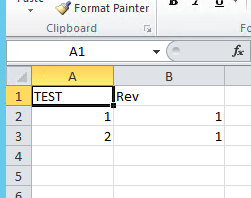
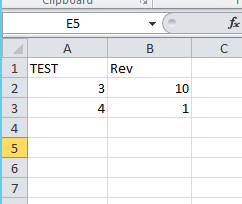
  • Create an Excel project with two worksheets.
    Sheet 1
ka04W000001IsFjQAK_0EM4400000025SZ.jpeg
  • Sheet 2
ka04W000001IsFjQAK_0EM4400000025Se.jpeg
  • In Strategy Web, click Create > Add External Data.
  • Select File from Disk and select your Excel project.
  • Click Prepare Data.
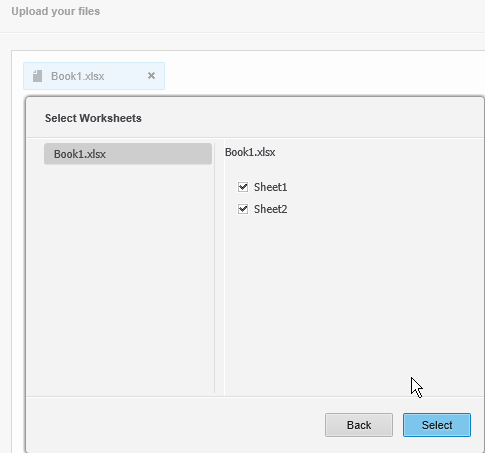
  • Select the two worksheets.
ka04W000001IsFjQAK_0EM4400000025Sa.jpeg
  • Click Select.
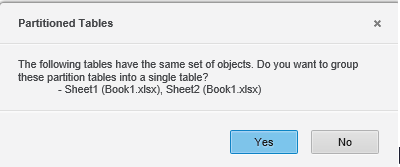
  • If prompted, click Yes to create a Group Partition. This groups the data into a single table.

ka04W000001IsFjQAK_0EM4400000025Sf.jpeg
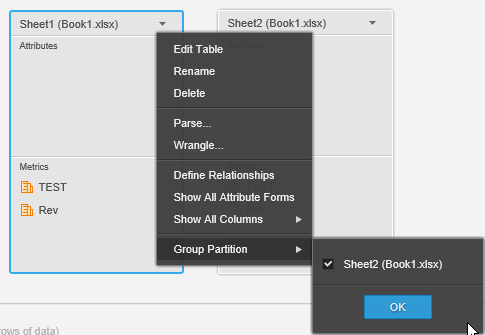
  • If you are not prompted, right-click a table on the Preview page and select Group Partition. 
ka04W000001IsFjQAK_0EM4400000025SY.jpeg
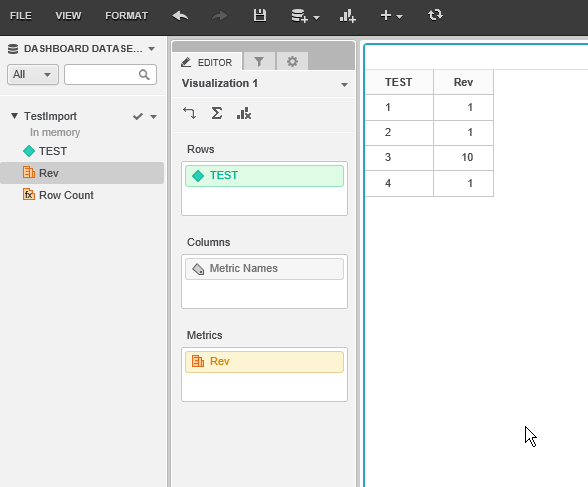
  • Both datasets are imported into the same cube. 
ka04W000001IsFjQAK_0EM4400000025Sb.jpeg

Comment

0 comments

Details

Knowledge Article

Published:

June 12, 2017

Last Updated:

November 27, 2019