EducationSoftwareStrategy.com
StrategyCommunity

Knowledge Base

Product

Community

Knowledge Base

TopicsBrowse ArticlesDeveloper Zone

Product

Download SoftwareProduct DocumentationSecurity Hub

Education

Tutorial VideosSolution GalleryEducation courses

Community

GuidelinesGrandmastersEvents
x_social-icon_white.svglinkedin_social-icon_white.svg
Strategy logoCommunity

© Strategy Inc. All Rights Reserved.

LegalTerms of UsePrivacy Policy
  1. Home
  2. Topics

KB31232: How to enable users to view and edit notes in MicroStrategy Developer and Web 9.4.1?


Stefan Zepeda

Salesforce Solutions Architect • Strategy


KB31232: How to enable users to view and edit notes in MicroStrategy Developer and Web 9.4.1?

Notes are a feature in Strategy 9.4.1 that allows user to track additional information about reports and documents. For more information about Strategy Notes feature refer to the following technotes:
KB30112: How to use the Notes feature in Strategy Web 9.4.1 and above?
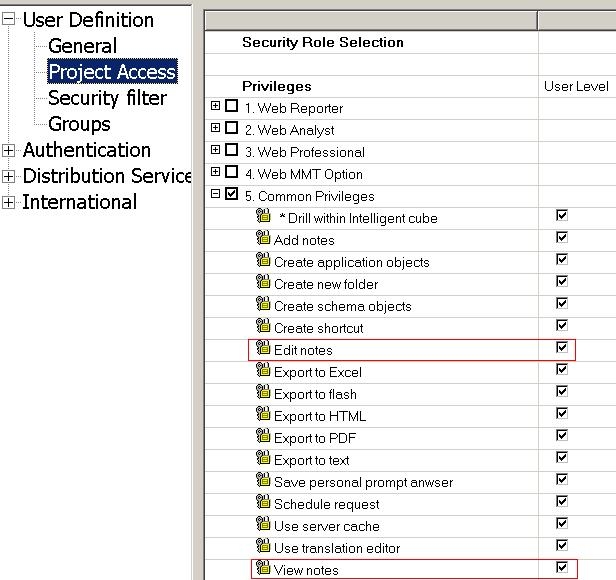
By default, only administrator has "View notes" and "Edit notes" privileges. To enable these user's privileges, follow the next steps in Strategy Developer 9.4.1:
 

ka02R000000kVJyQAM_0EM440000002ELX.jpeg


  1. Login to Strategy Developer as administrator.
  2. Go to Administration > User Manager and edit the user.
  3. In the user editor select User Definition > Project Access > 5. Common Privileges and select Edit notes and View notes as required. See screenshot below:
  4. Click OK to save the changes and exit.

 
The user will now have the privilege to edit and view Notes from the supported platforms.
 
417262


Comment

0 comments

Details

Knowledge Article

Published:

June 19, 2017

Last Updated:

April 16, 2018