EducationSoftwareStrategy.com
StrategyCommunity

Knowledge Base

Product

Community

Knowledge Base

TopicsBrowse ArticlesDeveloper Zone

Product

Download SoftwareProduct DocumentationSecurity Hub

Education

Tutorial VideosSolution GalleryEducation courses

Community

GuidelinesGrandmastersEvents
x_social-icon_white.svglinkedin_social-icon_white.svg
Strategy logoCommunity

© Strategy Inc. All Rights Reserved.

LegalTerms of UsePrivacy Policy
  1. Home
  2. Topics

KB31236: How to get Session State using Task API in MicroStrategy 9.x or above


Community Admin

• Strategy


The tech note explains how to get the session state using Task API in MicroStrategy 9.x and above

Generating session state using Task API is quite useful for displaying Strategy in third party web applications. GetSessionState task allows the customer to create session within the third party web application and connect to Strategy Web. The following steps explains how to get the session state using Task API in Strategy 9.x and above.
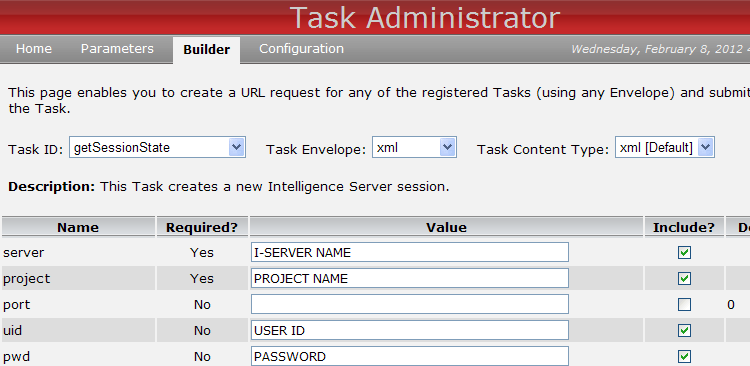

  • Go to Task API interface using the following URL: http://localhost/MicroStrategy/asp/TaskAdmin.aspx?pg=builder
  • Select getSessionState from the Task ID dropdown.
  • Select "XML" for the Task Envelope and "xml " for the Task Content Type
  • Fill in server, project, uid, and pwd information:

ka04W000000OfWIQA0_0EM4400000028E8.png
  • Click on Update URL.

ka04W000000OfWIQA0_0EM4400000028EA.png
  • Click on Invoke URL.
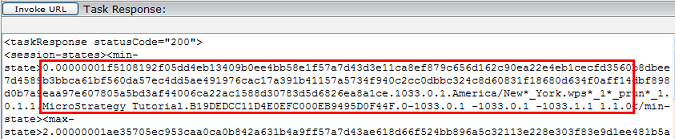
  • Session state is the content between the <min-state> and </min-state> under Task Response:

ka04W000000OfWIQA0_0EM4400000028EE.png


Comment

0 comments

Details

Knowledge Article

Published:

March 31, 2017

Last Updated:

March 31, 2017