EducationSoftwareStrategy.com
StrategyCommunity

Knowledge Base

Product

Community

Knowledge Base

TopicsBrowse ArticlesDeveloper Zone

Product

Download SoftwareProduct DocumentationSecurity Hub

Education

Tutorial VideosSolution GalleryEducation courses

Community

GuidelinesGrandmastersEvents
x_social-icon_white.svglinkedin_social-icon_white.svg
Strategy logoCommunity

© Strategy Inc. All Rights Reserved.

LegalTerms of UsePrivacy Policy
  1. Home
  2. Topics

KB312544: ‘Error when answering the prompt. Please review your answers’ message is displayed when attempting to add an attribute element that contains a colon (“:”) to a group in MicroStrategy Visual Insight 10.x


Community Admin

• Strategy


SUMMARY:
This issue has been classified as a defect by Strategy. The impact is limited to Strategy Web 10.x Visual Insight where an attribute element with a colon (“:”) in a name cannot be added to a Group without generating an error. There is a workaround for this issue. The issue is under investigation by Technology team.  
   
SYMPTOM:
In Strategy Visual Insight 10.x, using “Add to Group” a user attempts to combine some attribute elements into a group(s) and does not see any issue unless the attribute element contains “:” colon.  The image below shows the error received in Visual Insight:

ka04W000000ObJ9QAK_0EM4400000025QW.jpeg

 
STEPS TO REPRODUCE:

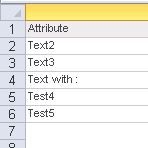
  1. In Strategy Tutorial, create a report with an attribute that contains colon in at least one attribute element or import the file from Excel. To demonstrate the issue the following file was created in Excel and imported to Strategy:
ka04W000000ObJ9QAK_0EM4400000025QU.jpeg

 
2.   Create a Visual Insight and then a grid visualization:

ka04W000000ObJ9QAK_0EM4400000025Qc.jpeg

 
3. Click on any attribute element that does not have a colon and add to a Group:

ka04W000000ObJ9QAK_0EM4400000025Qb.jpeg

 
4. Then,  using “Add to Group”, attempt to add the attribute element with colon to new created group to reproduce the issue:
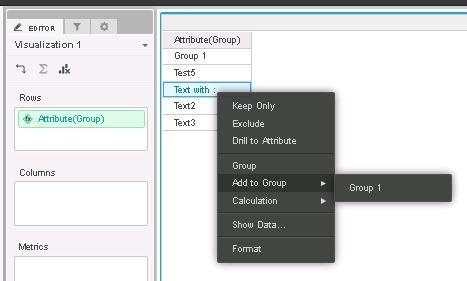
ka04W000000ObJ9QAK_0EM4400000025QS.jpeg


ka04W000000ObJ9QAK_0EM4400000025QQ.jpeg

 
CAUSE:
It appears to specifically affect Strategy 10.x when attempting to group attribute element with a colon. This has been classified as a defect.
 
WORKAROUND:
If possible, do not use colons in attribute names as a temporary workaround until the issue gets addressed
 
ACTION
This issue has been addressed in Strategy 10.7.
 
 
312544


Comment

0 comments

Details

Knowledge Article

Published:

June 13, 2017

Last Updated:

March 31, 2019