Starting with Strategy 9.0, Web Deliveries are handled by Distribution Services, which is a part of the Strategy Intelligence Server installation. Bulk exports are also now handled by the Strategy Intelligence Server.
Bulk Export is a feature in Strategy that allows users to export very large report results into Comma Separated Value (CSV) files. The reports configured to use bulk export are scheduled for execution using Send-Now or Scheduled Delivery in Strategy Web 9.x. When the Bulk Export report is executed, Strategy Intelligence Server creates a temporary table in the Project's Data Warehouse. Strategy Intelligence Server then incrementally fetches results from that table thereby achieving greater scalability and low memory consumption.
Note: The tables created in the project's warehouse are NOT true temporary tables. As part of the bulk export execution however, a DROP statement is issued against the table which is created, once the bulk export execution is completed.
The naming convention for these temporary tables is of the form: <Prefix><UserName>_<JobID>_<Time at which temp table is created>
For example, a table name can be: TestAdministrator_310_085701
In this example, Test is the prefix of the temporary table that is specified in the bulk export definition as shown below. It is not mandatory to specify a prefix.
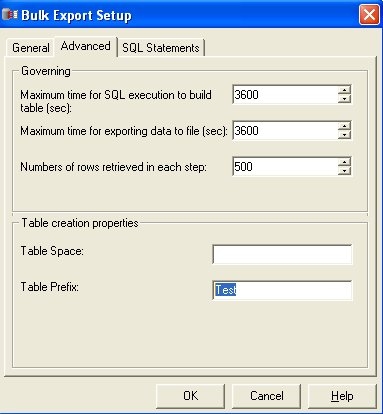
Administrator is the name of the Strategy user who triggered the bulk export execution.
310 is the Strategy Intelligence Server Job ID which was created for this bulk export execution.
085701 is the timestamp at which the temporary table is created. In this case, the table was created at 8:57:01.
