EducationSoftwareStrategy.com
StrategyCommunity

Knowledge Base

Product

Community

Knowledge Base

TopicsBrowse ArticlesDeveloper Zone

Product

Download SoftwareProduct DocumentationSecurity Hub

Education

Tutorial VideosSolution GalleryEducation courses

Community

GuidelinesGrandmastersEvents
x_social-icon_white.svglinkedin_social-icon_white.svg
Strategy logoCommunity

© Strategy Inc. All Rights Reserved.

LegalTerms of UsePrivacy Policy
  1. Home
  2. Topics

KB31286: "Error occurred while retrieving the local machine name" error message while attempting to configure MicroStrategy Intelligence Server 9.x and 10.x using the MicroStrategy Configuration Wizard


Community Admin

• Strategy


When configuring MicroStrategy Intelligence Server Universal on Unix/Linux platforms using MicroStrategy Configuration Wizard, the following error occurs:

SYMPTOM:
 
When configuring Strategy Intelligence Server Universal on Unix/Linux platforms using Strategy Configuration Wizard, the following error occurs:
 

ka04W000000OhemQAC_0EM440000002B1C.png

 
Sample Code/Error
Error occurred while retrieving the local machine name. Please resolve the local host alias name problem before continuing with the configuration
 
CAUSE:
 
The hosts file does not include a valid entry for the host name of the Intelligence Server machine.
 
ACTION:
 
Follow the steps below to add a valid entry for the host name to match the correct IP address of the Intelligence Server machine:
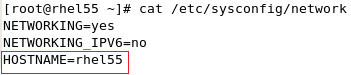
  • Get the host name from the /etc/sysconfig/network file, as shown below:
ka04W000000OhemQAC_0EM440000002B1A.png
  • Edit the /etc/hosts file, add an entry for the host name, as shown below:
ka04W000000OhemQAC_0EM440000002B1O.png
  • Save the /etc/hosts file.

After the modification above, try configuring Intelligence Server again with Configuration Wizard.


Comment

0 comments

Details

Knowledge Article

Published:

May 4, 2017

Last Updated:

May 4, 2017