EducationSoftwareStrategy.com
StrategyCommunity

Knowledge Base

Product

Community

Knowledge Base

TopicsBrowse ArticlesDeveloper Zone

Product

Download SoftwareProduct DocumentationSecurity Hub

Education

Tutorial VideosSolution GalleryEducation courses

Community

GuidelinesGrandmastersEvents
x_social-icon_white.svglinkedin_social-icon_white.svg
Strategy logoCommunity

© Strategy Inc. All Rights Reserved.

LegalTerms of UsePrivacy Policy
  1. Home
  2. Topics

KB31287: How to add row numbers in a grid report in MicroStrategy Developer 9.4.x - 10.x


Stefan Zepeda

Salesforce Solutions Architect • Strategy


MicroStrategy Developer 9.4.x - 10.x does not provide ability to add row numbers in grid reports. This is a known enhancement request.

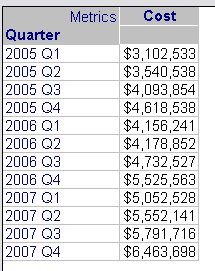
Strategy Developer 9.4.x - 10.x does not provide ability to add row numbers in grid reports.However, the user can simulate the same feature by adding a metric with "RunningCount" function. Please follow steps below:
For example, if the user would like to add row numbers in the report:
 

ka02R000000kcMeQAI_0EM440000002EL9.gif


  • Go to the report design view, and insert a new metric (a derived metric).
  • Use the definition below by using "RunningCount" function:
     
ka02R000000kcMeQAI_0EM440000002ELS.gif
  •  

    Sample Code/Error
    RunningCount(Cost)

     
  • Run the report to check the result:

ka02R000000kcMeQAI_0EM440000002ELH.gif


Comment

0 comments

Details

Knowledge Article

Published:

May 5, 2017

Last Updated:

May 5, 2017