SYMPTOM:
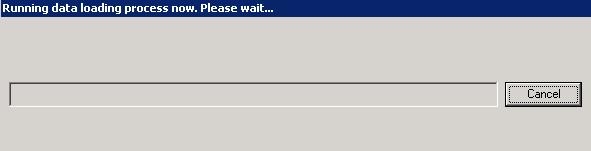
After running a Data Load in the Strategy Enterprise Manager Console 9.x, there is no progress reported and in order to close the application the ENTMGR.EXE process must be killed.
However, the Microsoft Windows Event Viewer log records the following error:
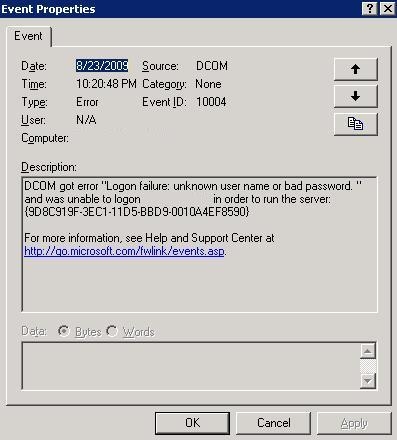
Sample Code/Error
DCOM got error "Logon failure: unknown user name or bad password. " and was unable to logon <user account> in order to run the server: {9D8C919F-3EC1-11D5-BBD9-0010A4EF8590} For more information, see Help and Support Center at http://go.microsoft.com/fwlink/events.asp.
CAUSE:
By default the DCOM application 'MAEMETL.ETL' is configured to use the 'Launching User' as the user account it runs under. However, sometimes this is changed to use a specific user account. The error in the Microsoft Windows Event Viewer is displayed when the password for this account was changed, but the modified password was not updated in the DCOM settings for the application 'MAEMETL.ETL'. This error can also occur if the account has been deleted.
ACTION:
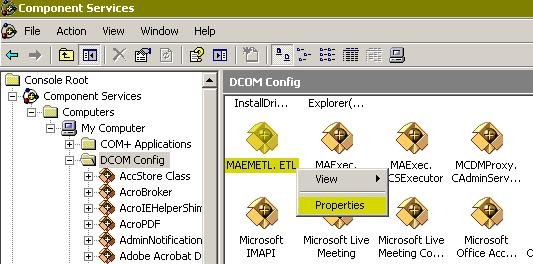
Open the Component Services tool found under Administrative Tools in the Control Panel. Find the 'MAEMETL.ETL' DCOM application, right click on it and select 'Properties' as shown below:
Update the user account information in the 'Identity' tab.
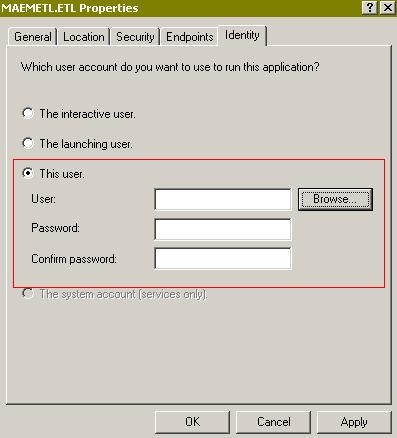
After clicking on the OK button, restart the Strategy Enterprise Manager Console 9.x for the changes to take affect.
