EducationSoftwareStrategy.com
StrategyCommunity

Knowledge Base

Product

Community

Knowledge Base

TopicsBrowse ArticlesDeveloper Zone

Product

Download SoftwareProduct DocumentationSecurity Hub

Education

Tutorial VideosSolution GalleryEducation courses

Community

GuidelinesGrandmastersEvents
x_social-icon_white.svglinkedin_social-icon_white.svg
Strategy logoCommunity

© Strategy Inc. All Rights Reserved.

LegalTerms of UsePrivacy Policy
  1. Home
  2. Topics

KB31299: Why some Database Instance names appear in bold in Project Configuration of MicroStrategy Developer 9.4.x and 10.x


Stefan Zepeda

Salesforce Solutions Architect • Strategy


This article discusses why some database instances appear bold within Project Configuration of MicroStrategy Developer while others do not.

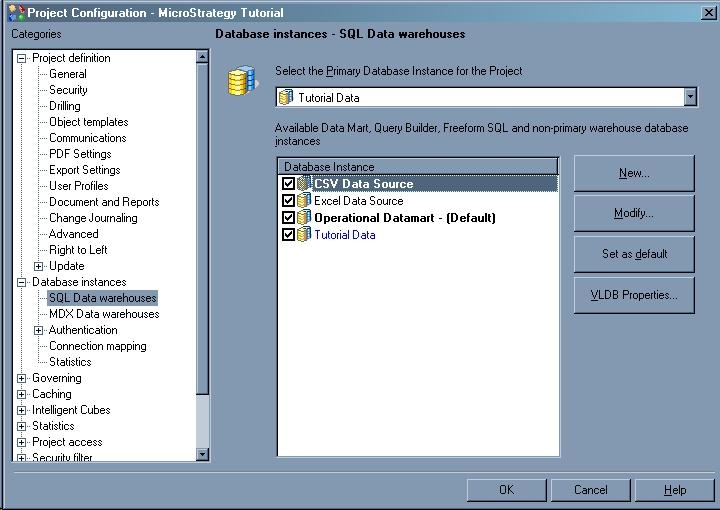
When you open Project Configuration > Database instances > SQL Data warehouses,  two types of database instances are listed; ones which are in bold-face, and others which are not.
ka02R000000kXeXQAU_0EM440000002ELG.jpeg

 
 Database Instances which appear in bold indicate that there is at least one object dependent on this Database Instance. For example, logical tables, Free Form SQL reports, or Query Builder reports.  Database Instances which appear in bold are always checked and they cannot be unchecked as there is some object in the project still dependent on the database instance.


Comment

0 comments

Details

Knowledge Article

Published:

April 4, 2017

Last Updated:

April 4, 2017