EducationSoftwareStrategy.com
StrategyCommunity

Knowledge Base

Product

Community

Knowledge Base

TopicsBrowse ArticlesDeveloper Zone

Product

Download SoftwareProduct DocumentationSecurity Hub

Education

Tutorial VideosSolution GalleryEducation courses

Community

GuidelinesGrandmastersEvents
x_social-icon_white.svglinkedin_social-icon_white.svg
Strategy logoCommunity

© Strategy Inc. All Rights Reserved.

LegalTerms of UsePrivacy Policy
  1. Home
  2. Topics

KB31313: Users cannot see the "My personal objects" folder when logging into a project in MicroStrategy Developer 9.x


Stefan Zepeda

Salesforce Solutions Architect • Strategy


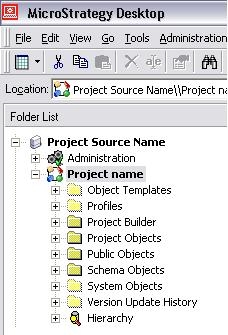
Users cannot see the "My personal objects" folder when logging into a project in MicroStrategy Developer 9.x

SYMPTOM:
After upgrading to Strategy 9.x, users cannot see the ‘My personal objects’ folder in Strategy Developer 9.x as shown in the image below:
 

ka02R000000kcZYQAY_0EM440000002EJ0.jpeg

 
Users cannot see their ‘My reports’ folder in Strategy Web either:
 

ka02R000000kcZYQAY_0EM440000002EJ5.jpeg

 
CAUSE:
Even though the profiles folders still exist in the project, the users are unable to see the a link to reach the folder in the interface
 
ACTION:
Run MDUpdate utility (located in C:\Program Files\Common Files\Strategy) against the project and select ‘Update System Objects’  as shown in the image below:
 

ka02R000000kcZYQAY_0EM440000002EJ7.jpeg

 
After the System Objects upgrade is completed, the ‘My personal objects’ folder should be visible to the users as expected
 

ka02R000000kcZYQAY_0EM440000002EIl.jpeg


Comment

0 comments

Details

Knowledge Article

Published:

April 12, 2017

Last Updated:

April 12, 2017