EducationSoftwareStrategy.com
StrategyCommunity

Knowledge Base

Product

Community

Knowledge Base

TopicsBrowse ArticlesDeveloper Zone

Product

Download SoftwareProduct DocumentationSecurity Hub

Education

Tutorial VideosSolution GalleryEducation courses

Community

GuidelinesGrandmastersEvents
x_social-icon_white.svglinkedin_social-icon_white.svg
Strategy logoCommunity

© Strategy Inc. All Rights Reserved.

LegalTerms of UsePrivacy Policy
  1. Home
  2. Topics

KB31337: How to remove Category, Series, Value from tooltips in a graph report in MicroStrategy Web 9.4.1 and above.


Community Admin

• Strategy


How to remove Category, Series, Value from tooltips in a graph report in MicroStrategy Web 9.4.1 and above.

By default, the tooltip in the graph report includes the words Category, Series, and Value.
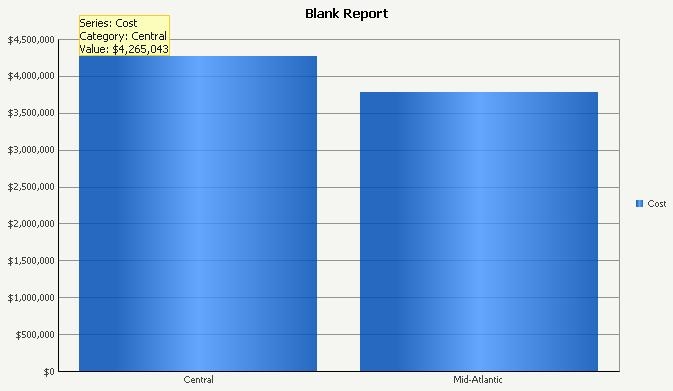
ka04W000001MKo5QAG_0EM4400000028FE.jpeg

 
In Strategy Web 9.4.1 and above, the tooltips can be customized using specific syntax through the Graph -> Format -> Series Labels -> Tooltip:

ka04W000001MKo5QAG_0EM4400000028F4.jpeg

 
For example, to remove the words Category, Series and Value, user can modify the syntax to {&SERIESLABEL} {&GROUPLABEL} {&VALUE}

ka04W000001MKo5QAG_0EM4400000028F3.jpeg

 
Click OK and the new Tooltip will apply:

ka04W000001MKo5QAG_0EM4400000028F6.jpeg


Comment

0 comments

Details

Knowledge Article

Published:

April 7, 2017

Last Updated:

April 7, 2017