EducationSoftwareStrategy.com
StrategyCommunity

Knowledge Base

Product

Community

Knowledge Base

TopicsBrowse ArticlesDeveloper Zone

Product

Download SoftwareProduct DocumentationSecurity Hub

Education

Tutorial VideosSolution GalleryEducation courses

Community

GuidelinesGrandmastersEvents
x_social-icon_white.svglinkedin_social-icon_white.svg
Strategy logoCommunity

© Strategy Inc. All Rights Reserved.

LegalTerms of UsePrivacy Policy
  1. Home
  2. Topics

KB313511: How to enable Dynamic Sourcing for an individual Intelligent Cube in MicroStrategy 10.


Community Admin

• Strategy


SYMPTOM:
There are two settings at the Project level that may cause the confusion and unwanted results. This Technical Note provides an explanation on these two settings and their interaction with settings at the Intelligent Cube level
 
STEPS TO REPRODUCE:
The steps below will provide steps for three different scenarios with Dynamic Sourcing
 

  1. Log in to Tutorial Project
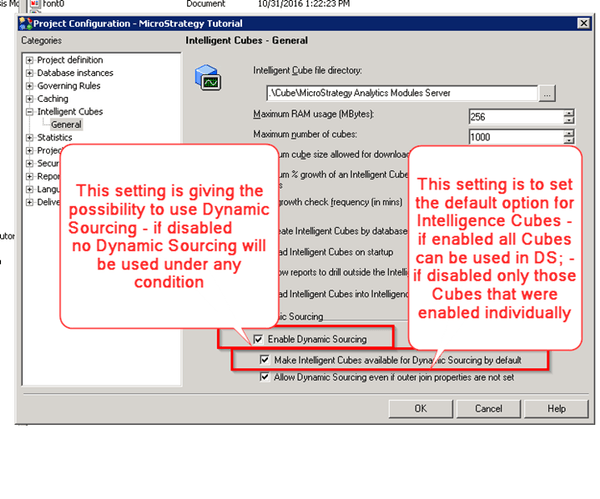
  2. Navigate to Project Configuration -> Intelligent Cubes -> General as shown below:


ka04W000000Oh4ZQAS_0EM44000000298B.jpeg
  1. Any change requires re-loading the project

 
1st Scenario
Dynamic Sourcing Enabled at the Project level and also by default on the Intelligent Cube level
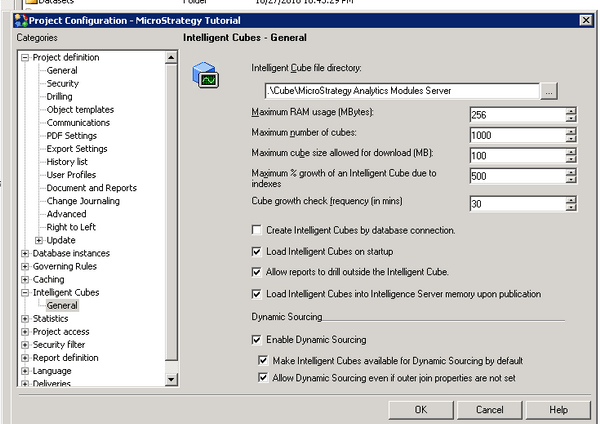
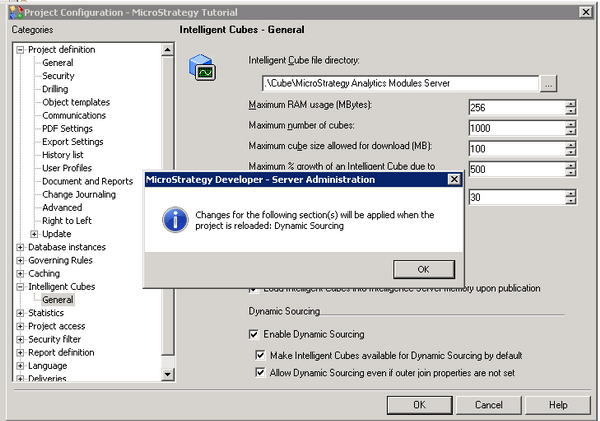
  1. Make sure that "Enable Dynamic Sourcing" under Project Configuration -> Intelligent Cubes -> General is enabled as per image below


ka04W000000Oh4ZQAS_0EM44000000298C.jpeg
  1. Save the changes
ka04W000000Oh4ZQAS_0EM44000000298H.jpeg


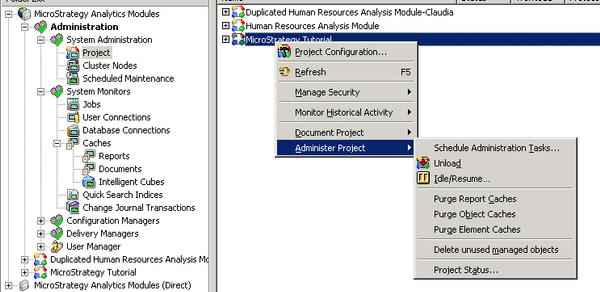
  1. Re-load the project as shown below:
ka04W000000Oh4ZQAS_0EM44000000297x.jpeg
  1. Create an Intelligent Cube 'C1' with 'Country' attribute
  2. Create a Report 'R1'  with 'Country' attribute
  3. Save the Report and close
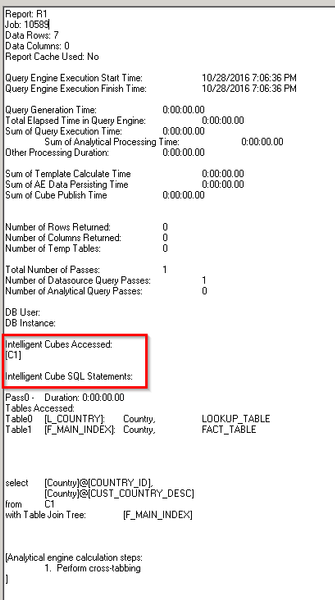
  4. Run the Report and check the SQL View
ka04W000000Oh4ZQAS_0EM44000000298I.jpeg

Dynamic Sourcing was used
 
2nd Scenario
Dynamic Sourcing disabled at the Project level and enabled for an individual Intelligent Cube
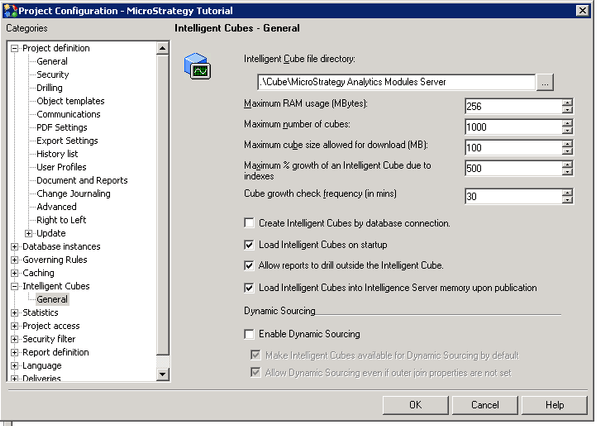
  1. Make sure that "Enable Dynamic Sourcing" under Project Configuration -> Intelligent Cubes -> General is disabled as per image below:


ka04W000000Oh4ZQAS_0EM44000000298K.jpeg


  1. Repeat the steps 2 and 3 from the 1st scenario
  2. Create an Intelligent Cube 'C1' with 'Country' attribute
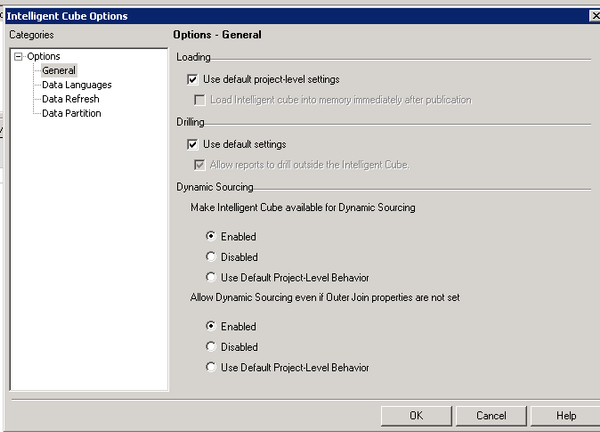
  3. Go to Data -> Configure Intelligent Cube -> General and set both "Make Intelligent Cube available for Dynamic Sourcing" and "Allow Dynamic Sourcing even if Outer Join properties are not set" to ‘Enabled‘ as per image below


ka04W000000Oh4ZQAS_0EM44000000298G.jpeg


  1. Create a Report 'R1'  with 'Country' attribute
  2. Save the Report and close
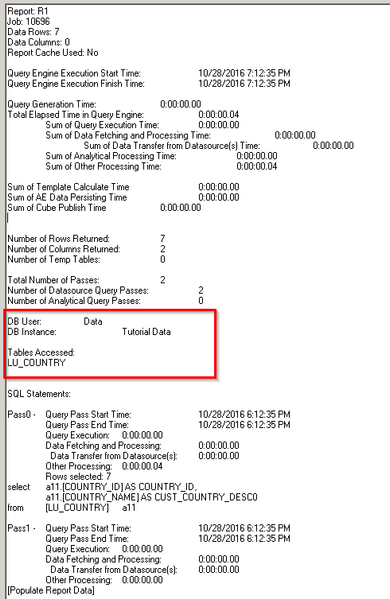
  3. Run the Report and check the SQL View as shown below:
ka04W000000Oh4ZQAS_0EM440000002980.jpeg

The behavior is expected – no setting at the Cube level can overcome the general setting to disable the Dynamic Sourcing
 
3rd Scenario
Dynamic Sourcing enabled at the Project level, but Intelligent Cubes are not available by default
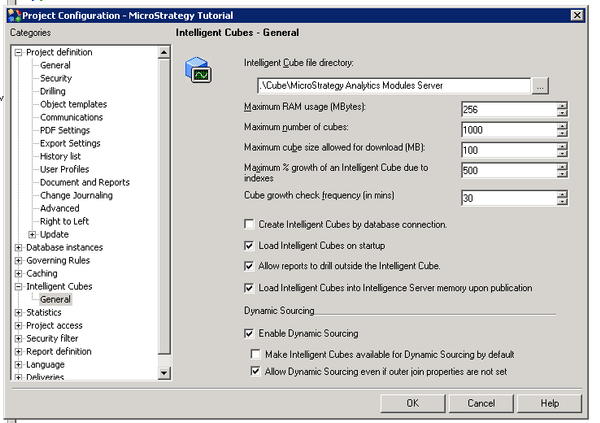
  1. Make sure that "Enable Dynamic Sourcing" under Project Configuration -> Intelligent Cubes -> General is set as per image below
ka04W000000Oh4ZQAS_0EM44000000298F.jpeg

The Intelligent Cube has been created with default settings (no changes were made)
  1. Repeat the steps 2 and 3 from the 1st scenario
  2. Create an Intelligent Cube 'C2' with 'Country' attribute
  3. Create a Report 'R2'  with 'Country' attribute
  4. Save the Report and close
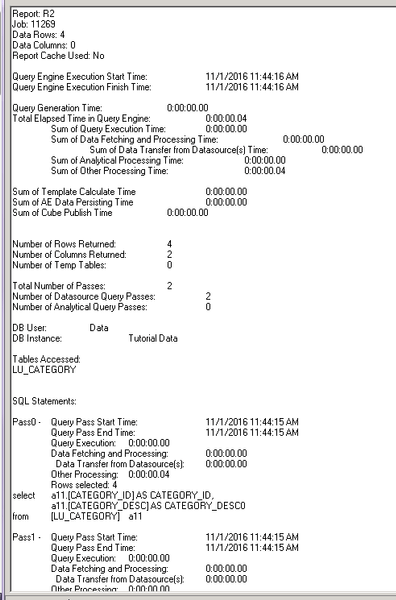
  5. Run the Report and check the SQL View
ka04W000000Oh4ZQAS_0EM44000000297z.jpeg

 
The behavior is expected: no Dynamic Sourcing was used, even though it is enabled at the Project level, because by default all Intelligent Cubes are not available Dynamic Sourcing
 
Dynamic Sourcing has been enabled at the Intelligent Cube level
 

  1. Repeat the steps 2 and 3 from the 1st scenario
  2. Create an Intelligent Cube 'C3' with 'Country' attribute
  3. Go to Data -> Configure Intelligent Cube -> General and set both "Make Intelligent Cube available for Dynamic Sourcing" and "Allow Dynamic Sourcing even if Outer Join properties are not set" to ‘Enabled‘
  4. Create a Report 'R3'  with 'Country' attribute
  5. Save the Report and close
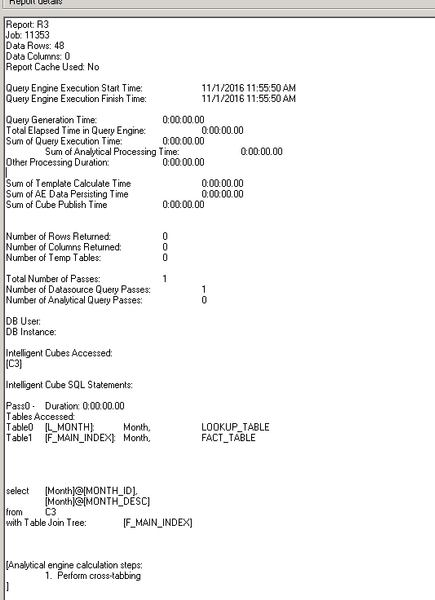
  6. Run the Report and check the SQL View


ka04W000000Oh4ZQAS_0EM44000000298J.jpeg

 
Dynamic Sourcing is used 
 
ACTION RESOLUTION:
Please, check In-Memory Analysis for additional information.


Comment

0 comments

Details

Knowledge Article

Published:

June 5, 2017

Last Updated:

June 5, 2017