You can use Strategy Command Manager to communicate with Strategy Intelligence Server via TLS (Transport Layer Security) so that all communications with the tool and the Intelligence Server are cryptographically protected. This document describes the required changes for Command Manager to support TLS on connections to Intelligence Server.
Adding support for TLS in Command Manager requires minimal changes to the GUI and script language. There are three user-facing changes:
MsiReg.reg. Starting in Strategy 2021 Update 2, TLS can be configured via the Options menu in Command Manager.
USESSLparameter for some existing commands in the Command Manager scripting language.
Use of TLS in Command Manager requires configuring a Java truststore file and the following registry keys:
TrustStorePathand
TrustStorePassphrase
trusted.jks, is generated under the same directory.
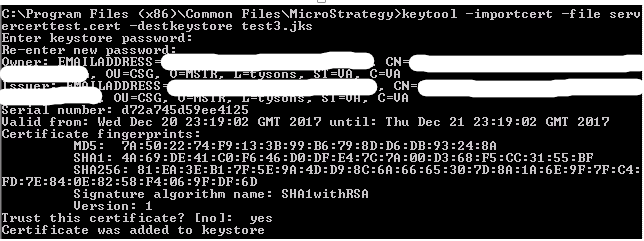
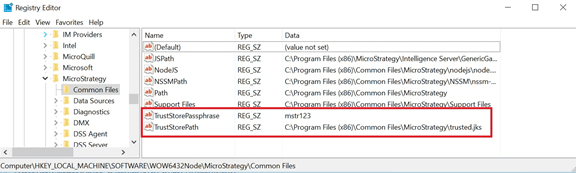
TrustStorePathconfigures where the truststore (.jks) file is located and is specified using an absolute path.
TrustStorePassphraseis the password that must be entered before the contents of the truststore can be accessed. Both of these registry keys must be manually created on all Command Manager machines where SSl connectivity is required. The configuration of these registry keys differs depending on your Strategy version.
MsiReg.reg.
TrustStoreis stored in plain text, unencrypted.
TrustStorePassphraseis stored in an encrypted form.
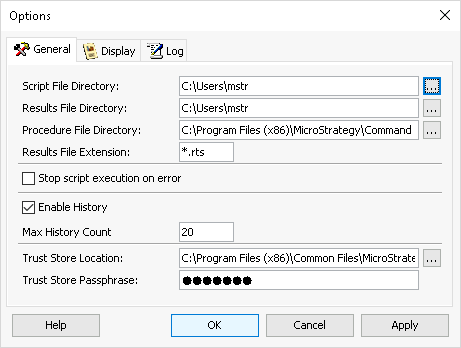

The Command Manager application provides a convenient feature that allows the user to create a project (data) source directly in the application rather than switching to Strategy Developer. Adding support for TLS is done by selecting the Use SSL checkbox. This allows the new source to be created with the UseSSL setting enabled.
The Command Manager scripting language contains the following commands that allow the script to create connections to the Intelligence server. These commands contain a
USESSLparameter that allows the script to indicate the connection should use TLS.
CONNECT SERVER "Intelligence Server name" USER "user name" PORT 39321 USESSL;
GET STATISTICSINFO FOR PROJECTS IN SERVERS SERVER "Intelligence Server name" LOGIN "user name" PASSWORD "" PORT 39321 USESSL;
