EducationSoftwareStrategy.com
StrategyCommunity

Knowledge Base

Product

Community

Knowledge Base

TopicsBrowse ArticlesDeveloper Zone

Product

Download SoftwareProduct DocumentationSecurity Hub

Education

Tutorial VideosSolution GalleryEducation courses

Community

GuidelinesGrandmastersEvents
x_social-icon_white.svglinkedin_social-icon_white.svg
Strategy logoCommunity

© Strategy Inc. All Rights Reserved.

LegalTerms of UsePrivacy Policy
  1. Home
  2. Topics

KB31368: HTML references to images in an attribute form do not render in Flash Mode for MicroStrategy Web 9.4.1 and above.


Community Admin

• Strategy


HTML references to images in an attribute form do not render in Flash Mode for MicroStrategy Web 9.4.1 and above.

SYMPTOM:
HTML references to images in an attribute form do not render in Flash Mode in Strategy Web 9.4.1 and above.
 
STEPS TO REPRODUCE
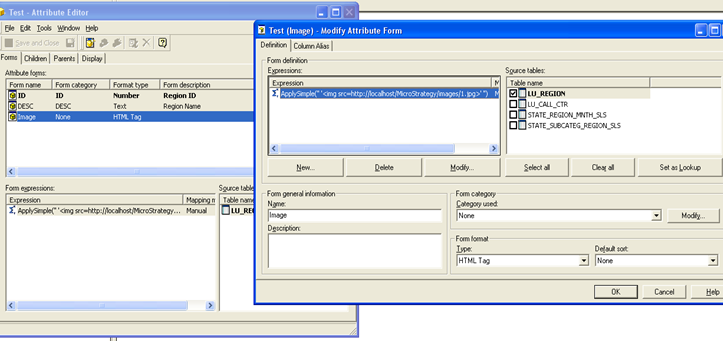
  • Create an attribute with an attribute form containing reference to an image using an ApplySimple statement as shown below:
     
     
ka04W000000OdUFQA0_0EM4400000028Ek.jpeg
  •  
    
    Sample Code/Error
    ApplySimple("'<img src=http://localhost/Strategy/images/1.jpg>'")
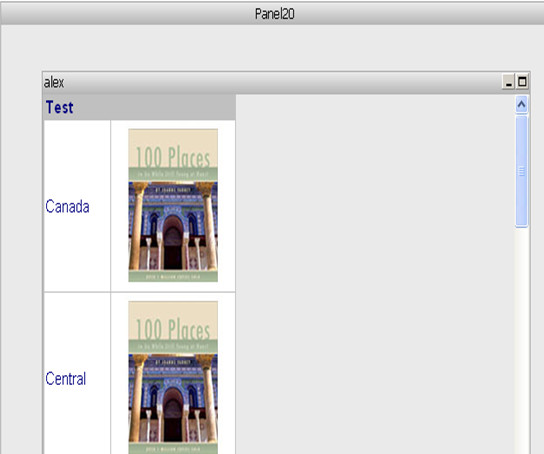
  • Place the above attribute in a report and include this report in a document.
  • Notice the image is rendered correctly in Interactive View mode when the grid is placed in the detail header section, as shown below: 
     
ka04W000000OdUFQA0_0EM4400000028Ei.jpeg
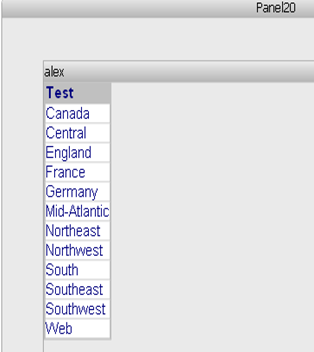
  • However, in Flash mode the images are not rendered:
     
     
ka04W000000OdUFQA0_0EM4400000028Ez.jpeg

CAUSE:
This behavior is working as designed in Strategy. Strategy does not support HTML referenced images in Flash view mode.
ACTION:
The attribute needs to be configured to use image data form type for the specific image attribute form. This is the only data type that will display images in flash mode at this moment. Do not forget to update the schema after this change is applied.


Comment

0 comments

Details

Knowledge Article

Published:

April 5, 2017

Last Updated:

April 5, 2017